
...
通过在客户端集成亚马逊云科技 WAF Client SDK,可以高效方便地帮助业务抵御 7 层 DDoS 攻击。与传统通过 WAF 自定义规则进行 Token 过滤的方式相比,WAF 智能威胁检测仅需要在前端集成 SDK(支持 iOS/Android/Web),免去了开发和维护复杂的 Token 管理和分发流程。WAF SDK 与 WAF 后端自动实现了基于 Client Session 的 、的 Token 分发和校验机制,简化了安全管理的复杂度。
...
Bot Control Rules 选择 CAPTCHA
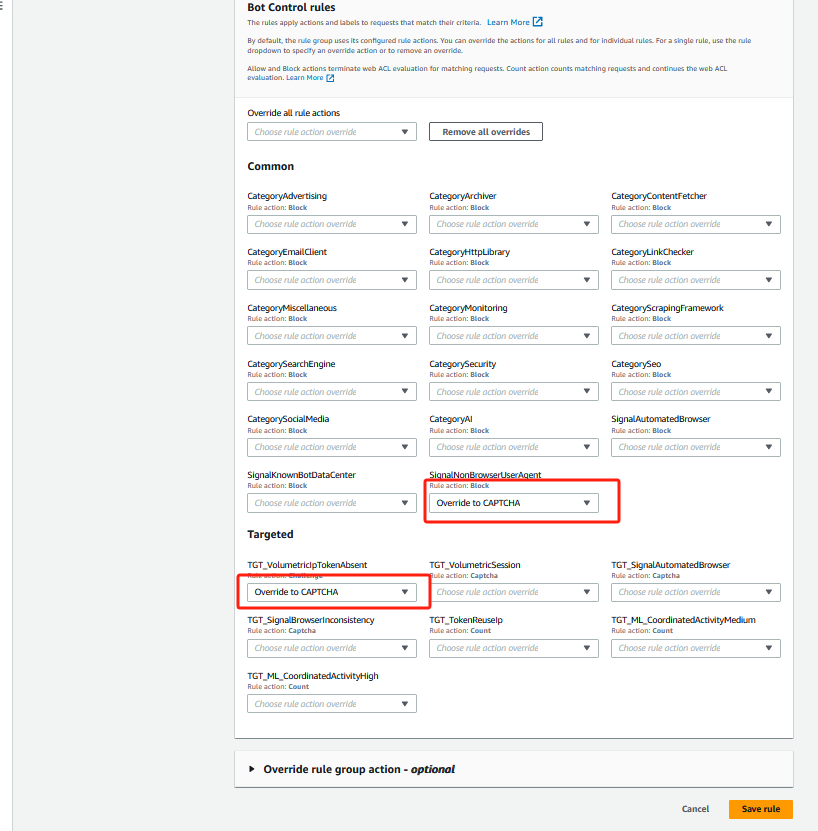
webacl-alb-api-001默认规则:AWS-AWSManagedRulesBotControlRuleSet规则如下AWSManagedRulesBotControlRuleSet规则如下:
| Code Block | ||
|---|---|---|
| ||
{
  "Name": "AWS-AWSManagedRulesBotControlRuleSet",
  "Priority": 0,
  "Statement": {
    "ManagedRuleGroupStatement": {
      "VendorName": "AWS",
      "Name": "AWSManagedRulesBotControlRuleSet",
      "ScopeDownStatement": {
        "AndStatement": {
          "Statements": [
            {
              "ByteMatchStatement": {
                "SearchString": "/waf/query",
                "FieldToMatch": {
                  "UriPath": {}
                },
                "TextTransformations": [
                  {
                    "Priority": 0,
                    "Type": "LOWERCASE"
                  }
                ],
                "PositionalConstraint": "EXACTLY"
              }
            },
            {
              "NotStatement": {
                "Statement": {
                  "ByteMatchStatement": {
                    "SearchString": "POST",
                    "FieldToMatch": {
                      "Method": {}
                    },
                    "TextTransformations": [
                      {
                        "Priority": 0,
                        "Type": "NONE"
                      }
                    ],
                    "PositionalConstraint": "EXACTLY"
                  }
                }
              }
            }
          ]
        }
      },
      "ManagedRuleGroupConfigs": [
        {
          "AWSManagedRulesBotControlRuleSet": {
            "InspectionLevel": "TARGETED",
            "EnableMachineLearning": true
          }
        }
      ],
      "RuleActionOverrides": [
        {
          "Name": "SignalNonBrowserUserAgent",
          "ActionToUse": {
            "Captcha": {}
          }
        },
        {
          "Name": "TGT_VolumetricIpTokenAbsent",
          "ActionToUse": {
            "Captcha": {}
          }
        }
      ]
    }
  },
  "OverrideAction": {
    "None": {}
  },
  "VisibilityConfig": {
    "SampledRequestsEnabled": true,
    "CloudWatchMetricsEnabled": true,
    "MetricName": "AWS-AWSManagedRulesBotControlRuleSet"
  }
} |
...
Block-Requests-With-Missing-Or-Rejected-Token-Label自定义规则如下:| Code Block | ||
|---|---|---|
| ||
{
  "Name": "Block-Requests-With-Missing-Or-Rejected-Token-Label",
  "Priority": 1,
  "Statement": {
    "AndStatement": {
      "Statements": [
        {
          "OrStatement": {
            "Statements": [
              {
                "LabelMatchStatement": {
                  "Scope": "LABEL",
                  "Key": "awswaf:managed:token:absent"
                }
              },
              {
                "LabelMatchStatement": {
                  "Scope": "LABEL",
                  "Key": "awswaf:managed:token:rejected"
                }
              }
            ]
          }
        },
        {
          "NotStatement": {
            "Statement": {
              "ByteMatchStatement": {
                "SearchString": "POST",
                "FieldToMatch": {
                  "Method": {}
                },
                "TextTransformations": [
                  {
                    "Priority": 0,
                    "Type": "NONE"
                  }
                ],
                "PositionalConstraint": "EXACTLY"
              }
            }
          }
        }
      ]
    }
  },
  "Action": {
    "Block": {}
  },
  "VisibilityConfig": {
    "SampledRequestsEnabled": true,
    "CloudWatchMetricsEnabled": true,
    "MetricName": "Block-Requests-With-Missing-Or-Rejected-Token-Label"
  }
} |
...
第二步:查看和复制JavaScript Integration URL地址
从 WAF 的控制台中进入Application integration,选择Captcha integration 选项,这里会显示已经开启 AWSManagedRulesBotControlRuleSet 规则的 ACL。
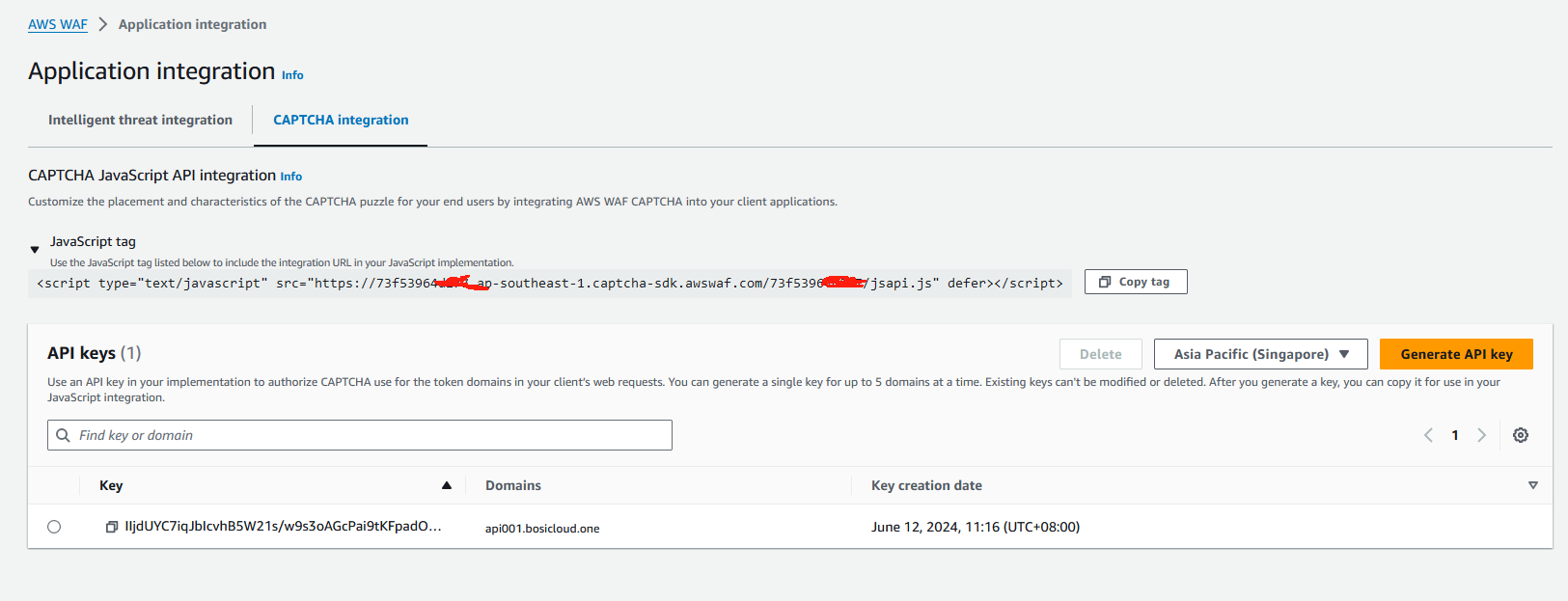
需要把 ACL 所对应的 JavaScript Integration URL 复制到 Web 应用的前端代码的<head><把ACL所对应的JavaScript Integration URL添加到前端代码的<head></head>之间。
...
1、WEB前端代码样例
...
第三步,集成和部署前端代码
WAF client API 向后端发起了Post的waf/query请求,后端使用 AWS EC2做为测试服务器部署了waf/query服务,实现返回http response,并通过 ALB 提供对外访问,ALB 被刚才配置的 WEB ACL 所保护。
1、WEB前端代码
| Code Block | ||
|---|---|---|
| ||
<!DOCTYPE html>
<html lang="en">
<head>
    <meta charset="UTF-8">
    <title>Waf Captcha Test</title>
	    <script type="text/javascript" src="https://73f53964xxxx.ap-southeast-1.captcha-sdk.awswaf.com/73f53964xxxx/jsapi.js" defer></script>
</head>

<body>

    <h1>Login Page</h1>

    <p>Click on the below button to login</p>

    <button onclick="userAction()">Login</button>


    <script type="text/javascript">
	        const apiURL = 'http://api001.bosicloud.one/waf/query';

        // 显示验证码
        function showMyCaptcha() {
            const container = document.getElementById('container');
            AwsWafCaptcha.renderCaptcha(container, {
                apiKey: 'xxxxUYC7iqJbIcvhB5W21s/w9s3oAGcPai9tKFpadOUctVCXTZ0KndUbGATzSVqLx7s5dzl4MKwudqYWIEeyv0gnYZuSPchyf1mgZAXjRveATBmosCj2h3LEC2jAsagSWpzQGofjBvhFlC8CMnSmapPY8kekeIABcCyycj4rGUPVIX/iRAlGyZEFat68AfMJmsvoxRYiSIQQt1cJZnTNFlg/Uam3fQW9hFy/n6HJnO3nxs+kFwjotKnzMbHGOJXpbZlakYivF6t6mFoEea5PftXxszvDEdjJ6sUZI4aQbrJTfIcRF/9cM2L2WjNs0sVCj9fqu1lI75k2txelIrwoHOBxgJlSo8P23e5CShd1fBkYJgGdj8BobiIoMEqWgtIUN8s54EcaRzGUAZqinqsEONpBn8SBViBpl5I+RuiiEYsRBXpfHUzb5mbo/lzgO5YRCezY+B2LFAHmLzy6xeq390ig6xKmPRNXItxTDIudPELhIVO8rJ5vrYm+yf8wV1ppyJXuNP9pq9ifS2+jFfCt5kCNrjunTF0Hzbt08qHgPE1OZb9c2dSyXK8pvDGyaIbjROLgcCcJ7mRKqk2BvzSTCkY34SC98upXGUkMn1o36aOrbZoM15GcBGKPnQ0E0PmQrnfGGaIDJFZJRH8Hv/Q2s/o1GrluRmGEN39eeGuyYEs=_w9s3oAGcPai9t_0_1xxxx',
                onSuccess: successFunction,
                onError: errorFunction,
            });
        }

        // 验证码成功回调函数
        function successFunction() {
            const container = document.getElementById('container');
            container.innerHTML = '';
        AwsWafIntegration    AwsWafIntegration.fetch(apiURL, {}).then(response => {
                response.json().then(myJson => { renderResponse(myJson) });
            });
        }

        // 验证码错误回调函数
        function errorFunction(error) {
            console.log(error);
        }

    function renderResponse(json) {    // 渲染请求响应结果
        iffunction renderResponse(json) {
            const container.innerHTML = "Result: document.getElementById('container');
            if (json) {
                container.innerHTML = "Result: The request resulted isin Success.";
            } else {
                container.innerHTML = "Result: The request resulted isin Error.";
            }
        }

    function userAction    // 用户操作函数
        function userAction() {
		            const container = document.getElementById('container');
		            container.innerHTML = '';


		 AwsWafIntegration.fetch(apiURL, { method: 'POST' }).then(response => {
			if ( response.status == 405) {
				showMyCaptcha();
			} else {
				response.json().then(myJson => { renderResponse(myJson) });
			}
		});
    }
</script>

<p>Hello WAF!</p>
<div                 if (response.status == 405) {
                    showMyCaptcha();
                } else {
                    response.json().then(myJson => { renderResponse(myJson) });
                }
            });
        }
    </script>

    <p>Hello WAF!</p>
    <div id='container'></div>

</body>
</html> |
WAF Client JavaScript API 提供了 AwsWafIntegration.fetch()方法,是原生 JS fetch()方法的 Wrapper。与原生 fetch()方法相比,内部逻辑封装了 token 的请求和计算,并在业务 http 请求中自动加上了 token, 调用方法的参数与原生 JS fetch()相同。
样例代码使用 WAF client API 向后端发起了一个 Post 请求。后端使用 AWS EC2 部署 Echo-Server 做为测试用的 Web 服务器,实现返回 http response,并通过 ALB 提供对外访问。ALB 被刚才配置的 WEB ACL 所保护。
2、WEB前端代码部署
...
</body>
</html> |
2、WEB前端代码部署
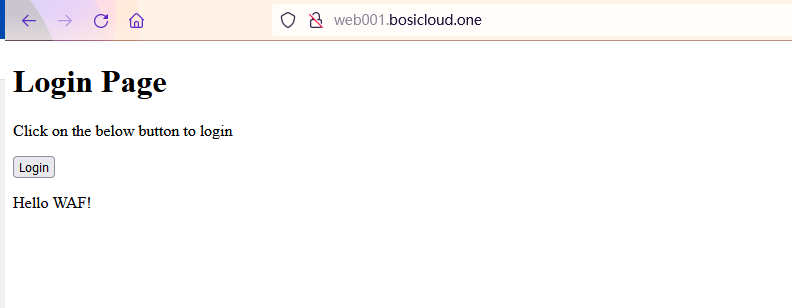
部署前端代码到EC2的NGINX里面,并访问web001.bosicloud.one的网页
NGINX的配置如下:
| Code Block | ||
|---|---|---|
| ||
    server {
        listen       80;
        #listen       [::]:80;
        #server_name  _;
        root         /usr/share/nginx/html;
        index index.html index.htm

        # Load configuration files for the default server block.
        include /etc/nginx/default.d/*.conf;

        error_page 404 /404.html;
        location = /404.html {
        }

        error_page 500 502 503 504 /50x.html;
        location = /50x.html {
        }
} |
效果如下:
...
第4步:配置AWF和ALB
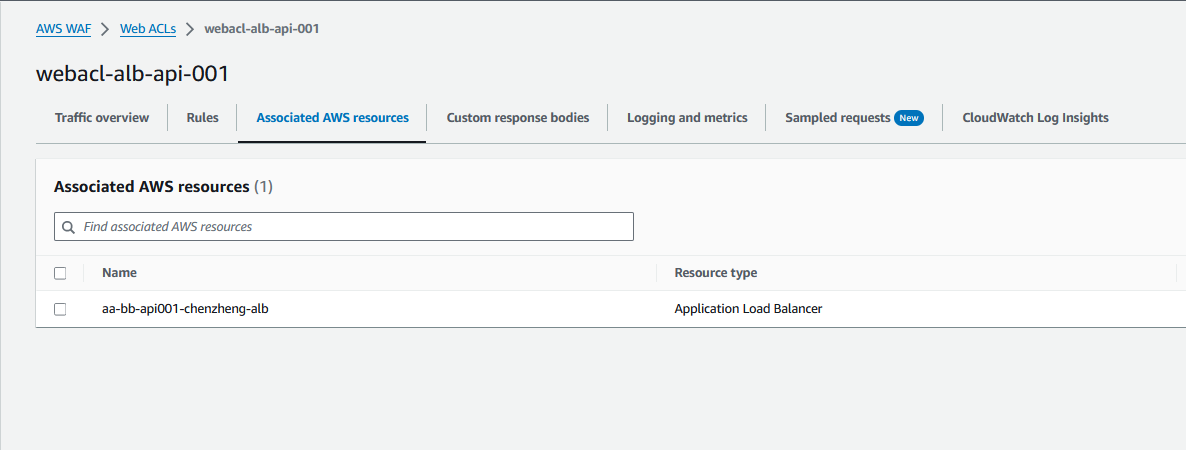
1、在WAF ACL关联ALB
2、配置Token Domain列表
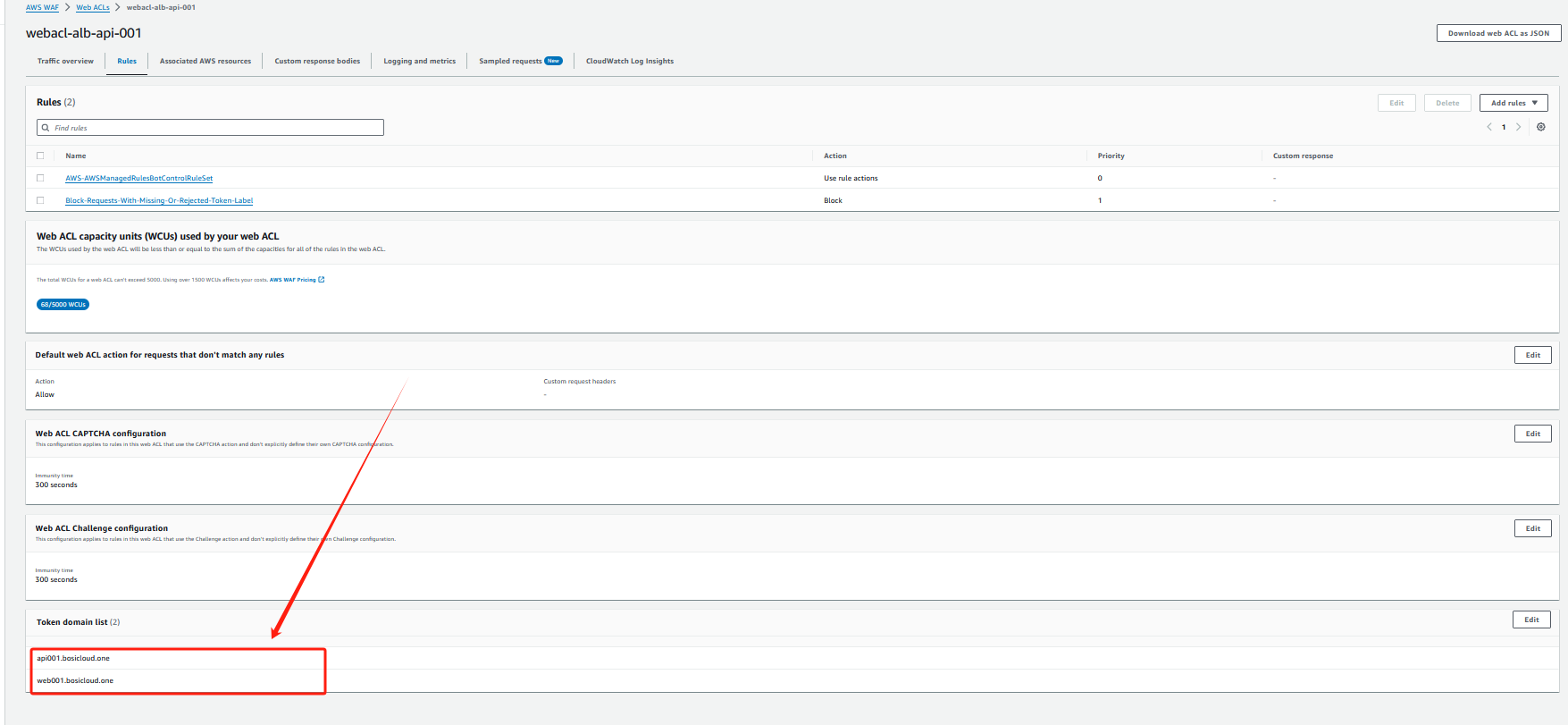
当 WAF 从 web 请求中侦测 token 时,默认只会接受与 ACL 所关联资源的 host domain。当请求是通过ALB 时,需要把custom host domain 配置到 Token domain 列表中。配置参考文档。列表中。
...
第5步:场景测试
1、访问集成 SDK 的前端网页,观察WEB-API的响应
访问 Web 前端,打开浏览器开发者模式。可以看到,页面在初始化后自动与 前端,打开浏览器开发者模式。
可以看到,页面在初始化后自动与 WAF 后台进行交互,获取了jsapi.js 并进行静默计算得到 token。在发起 token。
在发起 query 请求后,会自动在 cookie header 中带上 aws-waf-token。WAF token。
WAF 后台的 Bot control Rule 进行 token 校验成功后,流量被发送到 ALB。EchoALB。
Echo-Server 会把发送的请求原样返回,可以看到请求中包含了 token 信息。
...
| Code Block |
|---|
HTTP/1.1 200
Date: Thu, 13 Jun 2024 04:38:54 GMT
Content-Type: application/json;charset=UTF-8
Transfer-Encoding: chunked
Connection: keep-alive
Vary: Origin
Vary: Access-Control-Request-Method
Vary: Access-Control-Request-Headers
Access-Control-Allow-Origin: http://web001.bosicloud.one
Access-Control-Expose-Headers: X-Sms-Portal-Identity-Token
Access-Control-Allow-Credentials: true


{"msg":"success","code":0,"data":{"waf-query":"ok.","database":"ok.","redisquery":"ok.","statusdatabase":"ok"}} |
2、增加根据 Token 判断阻断的 WAF Rule
对于 Request 中不带有 token,或者 token 无效,我们希望 WAF 进行阻止的操作。需要做如下配置。
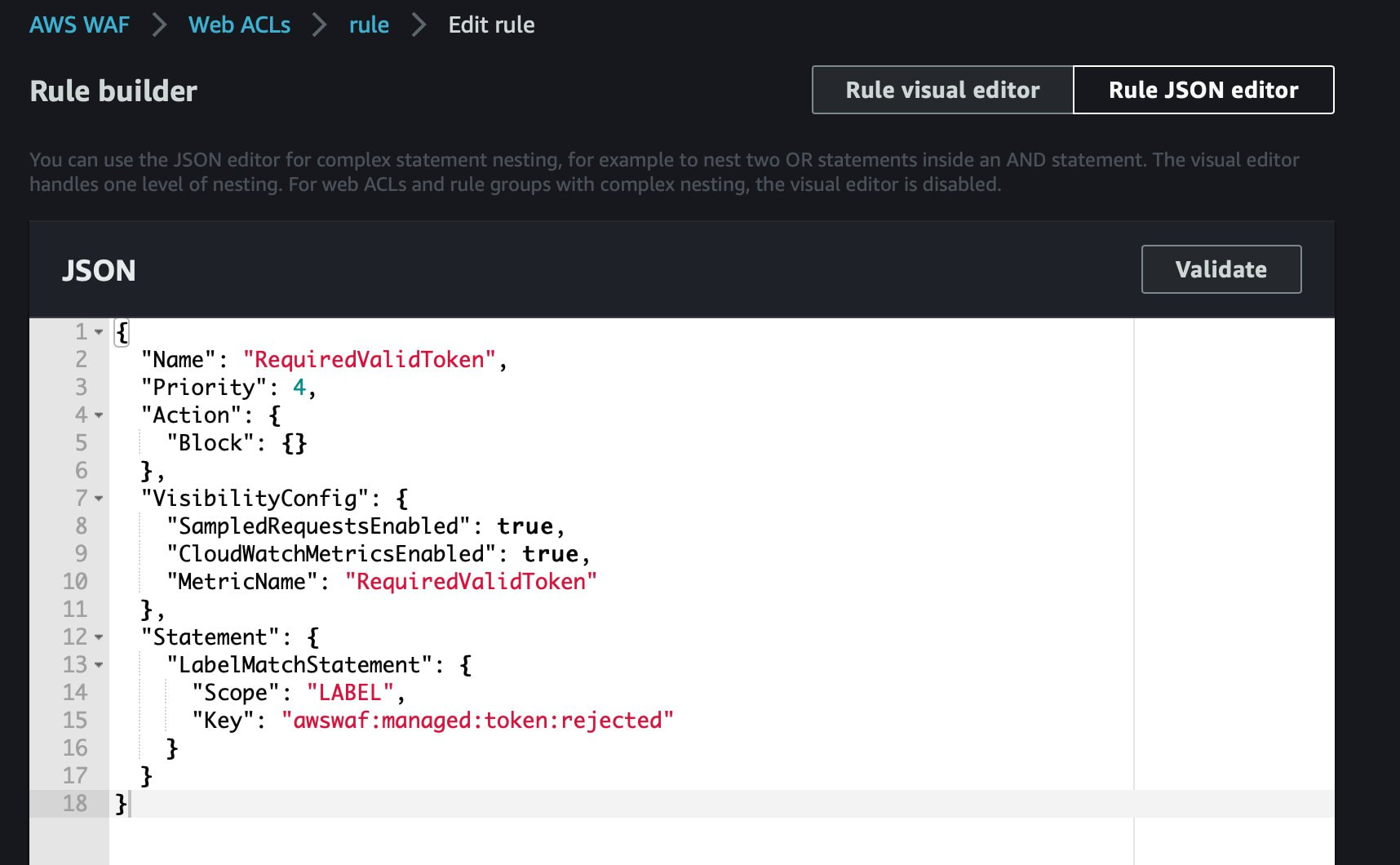
从流程上看,token 无效的请求,AWSManagedRuleBotControlRuleSet 会给这条 Request 加上 Label,用于表示 token 不存在或 token 无效。我们可以继续配置自定义规则,如果 request 包含特定 label,则说明请求来自非法客户端,进行阻断。
Awswaf:managed:token:absent,包含这个 label 说明 token 不存在
Awswaf:managed:token:rejected,包含这个 label 说明 token 无效
增加 Custom Rule,如果请求中包含上述 Label,则 Block

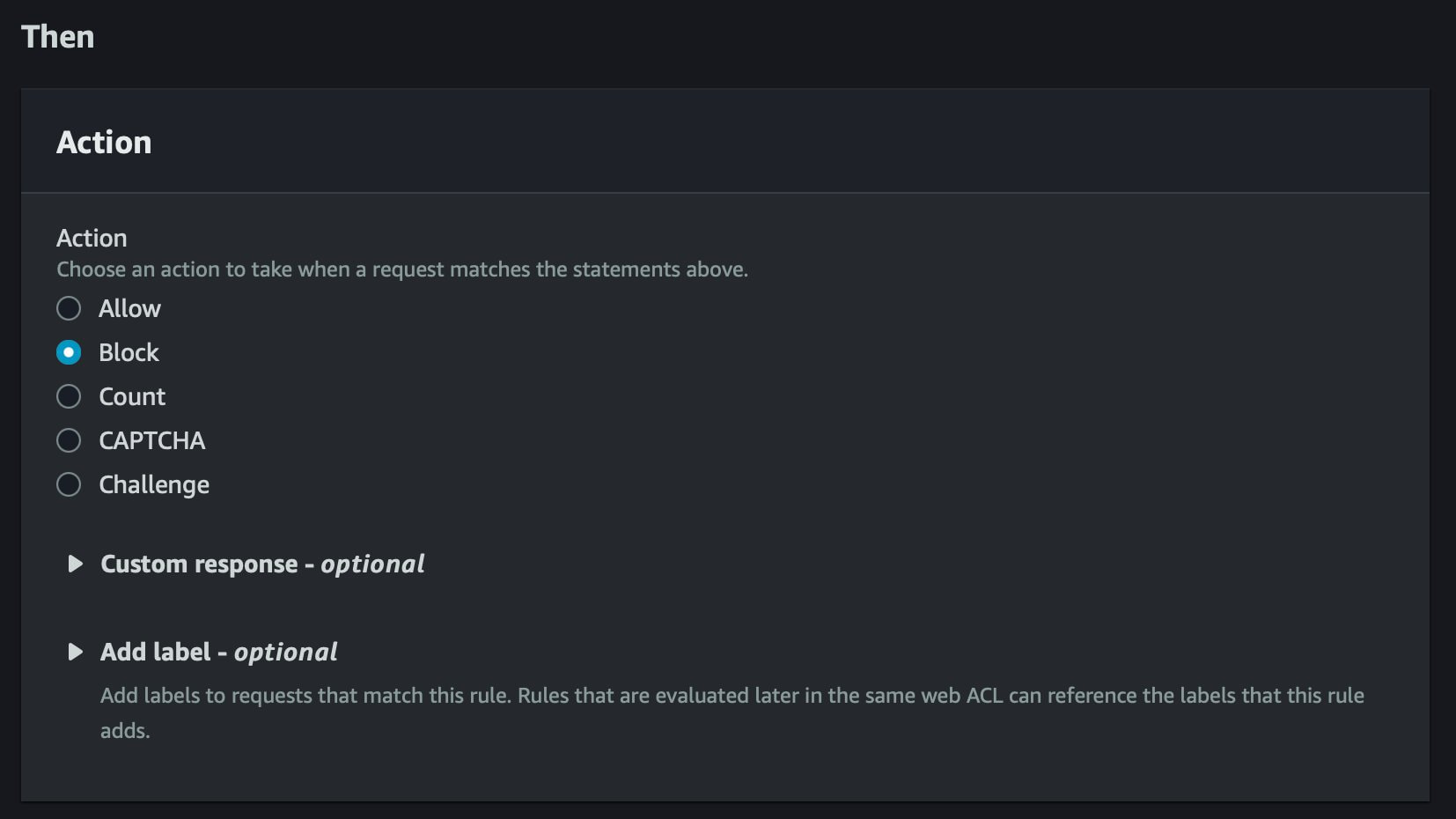
增加 Custom Rule,如果请求的 token 无效,则 Block。以下是等效配置的 JSON 描述:
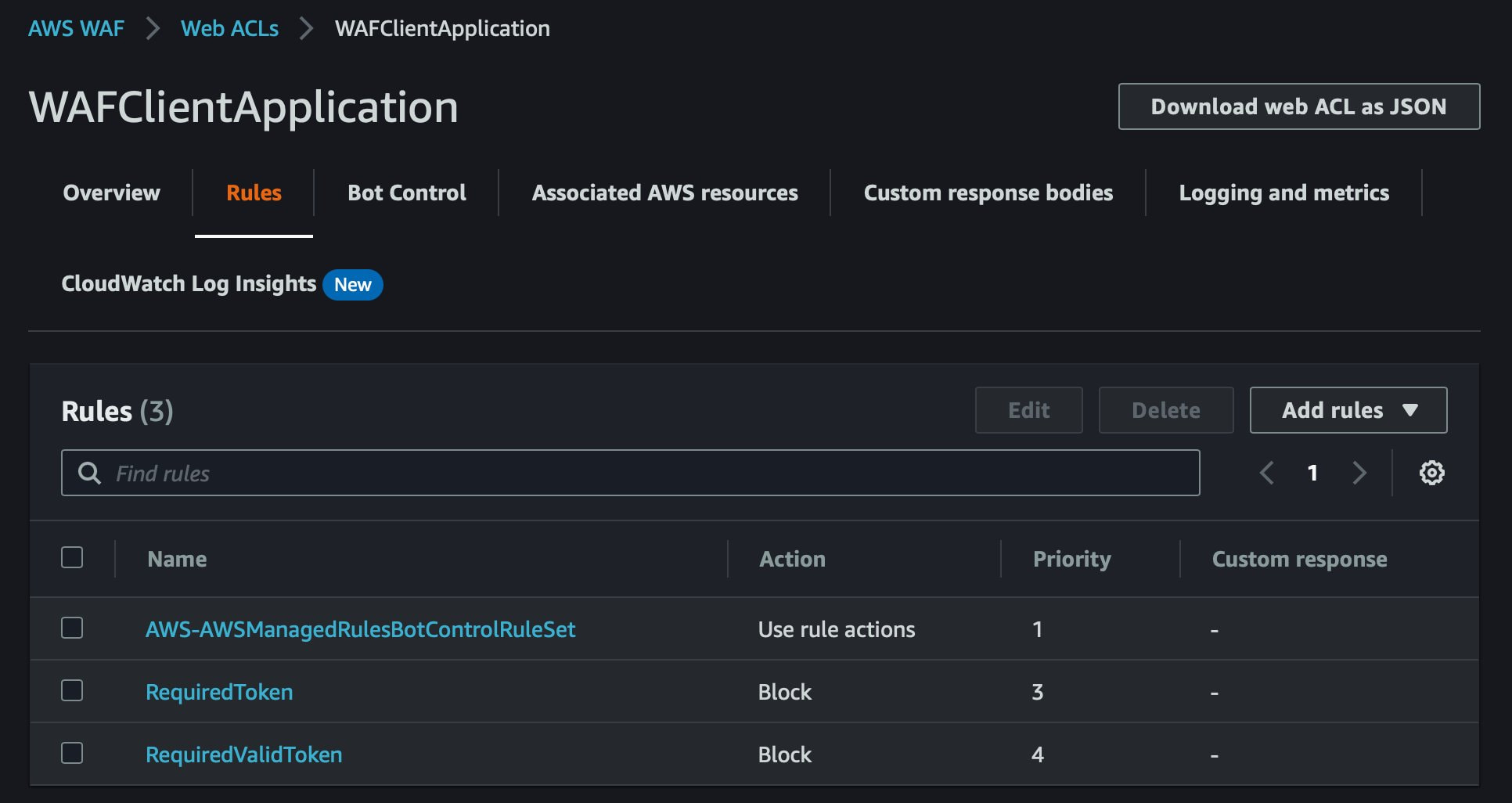
现在有三条 Rule 作用在 WAF ACL 上:
...
.","redis":"ok.","status":"ok"}} |
2、观察不带 Token 的请求访问业务后端的情况
修改 Web 前端,使用 JS 原生 fetch(),不带 token 发送请求给业务后端。
| Code Block | ||
|---|---|---|
| ||
<!DOCTYPE html> <html lang="en"> <head> <meta charset="UTF-8"> <title>Waf Captcha Test</title> <head> <meta charset="UTF-8"> <title>WAF Captcha Test</title> <!-- 引入 AWS WAF 验证码 SDK --> <script type="text/javascript" src="https://73f53964XXX.ap-southeast-1.captcha-sdk.awswaf.com/73f53964XXXX/jsapi.js" defer></script> </head> <body> <h1>Login Page</h1> <p>Click on the below button to login</p> <button onclick="userAction()">Login</button> <script type="text/javascript"> // 定义 API URL,指向后端的 WAF 查询接口 const apiURL = 'http://api001.bosicloud.one/waf/query'; // 显示验证码的函数 function showMyCaptcha() {() { // 获取验证码容器 const container = document.getElementById('container'); // 渲染验证码 AwsWafCaptcha.renderCaptcha(container, { apiKey: 'XXXXIIjdUYC7iqJbIcvhB5W21s/w9s3oAGcPai9tKFpadOUctVCXTZ0KndUbGATzSVqLx7s5dzl4MKwudqYWIEeyv0gnYZuSPchyf1mgZAXjRveATBmosCj2h3LEC2jAsagSWpzQGofjBvhFlC8CMnSmapPY8kekeIABcCyycj4rGUPVIX/iRAlGyZEFat68AfMJmsvoxRYiSIQQt1cJZnTNFlg/Uam3fQW9hFy/n6HJnO3nxs+kFwjotKnzMbHGOJXpbZlakYivF6t6mFoEea5PftXxszvDEdjJ6sUZI4aQbrJTfIcRF/9cM2L2WjNs0sVCj9fqu1lI75k2txelIrwoHOBxgJlSo8P23e5CShd1fBkYJgGdj8BobiIoMEqWgtIUN8s54EcaRzGUAZqinqsEONpBn8SBViBpl5I+RuiiEYsRBXpfHUzb5mbo/lzgO5YRCezY+B2LFAHmLzy6xeq390ig6xKmPRNXItxTDIudPELhIVO8rJ5vrYm+yf8wV1ppyJXuNP9pq9ifS2+jFfCt5kCNrjunTF0Hzbt08qHgPE1OZb9c2dSyXK8pvDGyaIbjROLgcCcJ7mRKqk2BvzSTCkY34SC98upXGUkMn1o36aOrbZoM15GcBGKPnQ0E0PmQrnfGGaIDJFZJRH8Hv/Q2s/o1GrluRmGEN39eeGXXXXuyYEsXXXXIIjdUYC7iN39eeGXXXXuyYEs=_0_1', onSuccess: successFunction, // 验证成功时调用的函数 onError: errorFunction, // 验证失败时调用的函数 }); } // 成功回调函数 function successFunction() { const container = document.getElementById('container'); container.innerHTML = ''; // 清空容器内容 AwsWafIntegration.fetch(apiURL, {}).then(response => { response.json().then(myJson => { renderResponse(myJson) }); }); } // 错误回调函数 function errorFunction(error) { console.log(error); // 输出错误信息到控制台 } // 渲染响应内容的函数 function renderResponse(json) { const container = document.getElementById('container'); if (json) { container.innerHTML = "Result: The request resulted is Success."; } else { container.innerHTML = "Result: The request resulted is Error."; } } // 用户操作处理函数 function userAction() { const container = document.getElementById('container'); container.innerHTML = ''; // 清空容器内容 AwsWafIntegration.fetch(apiURL, {method: 'POST'}).then(response => { if ( response.status == 405) { // 如果返回 405 状态码,显示验证码 showMyCaptcha(); } else { response.json().then(myJson => { renderResponse(myJson) }); } } }); } </script> <p>Hello WAF!</p> <div id='container'></div> <!-- 验证码和响应内容的容器 --> </body> </html> |
通过 Chrome 浏览器开发者模式可以看到,由于请求不带 token,请求被 WAF 所拒绝。
...