客户:振坤行

问题描述:客户需求加速海外独立站加载图片的速度,原图太大需要使用缩略图的功能。

背景描述

在现代的应用场景中,如电商、社交媒体、内容管理系统等,用户常常需要上传图片。为了优化用户体验和节省带宽,缩略图的生成成为关键需求。缩略图可以用于:

  1. 提高加载速度:在列表或预览中显示小尺寸图片,而非加载完整分辨率的原始文件。
  2. 节省存储和流量:减少图片的体积,降低存储成本和网络流量。
  3. 增强用户体验:快速展示图片缩略图,提高界面响应速度。

传统的缩略图处理方式通常依赖专用服务器,这带来了维护成本和资源分配压力。利用 AWS Lambda 的无服务器架构,可以高效处理图片生成缩略图的需求,无需管理底层基础设施。

架构概览

  1. 用户上传图片到 S3 源桶:用户通过前端应用或直接 API 将图片上传到指定的 S3 源桶。

  2. 触发 Lambda 函数:每当源桶接收到新图片,S3 会触发一个 Lambda 函数。

  3. 图片处理: Lambda 函数通过内置的图像处理库 Pillow下载图片,生成缩略图。

  4. 结果存储:生成的缩略图被存储到目标 S3 桶,并保证存储路径源文件路径保持一致。

部署步骤

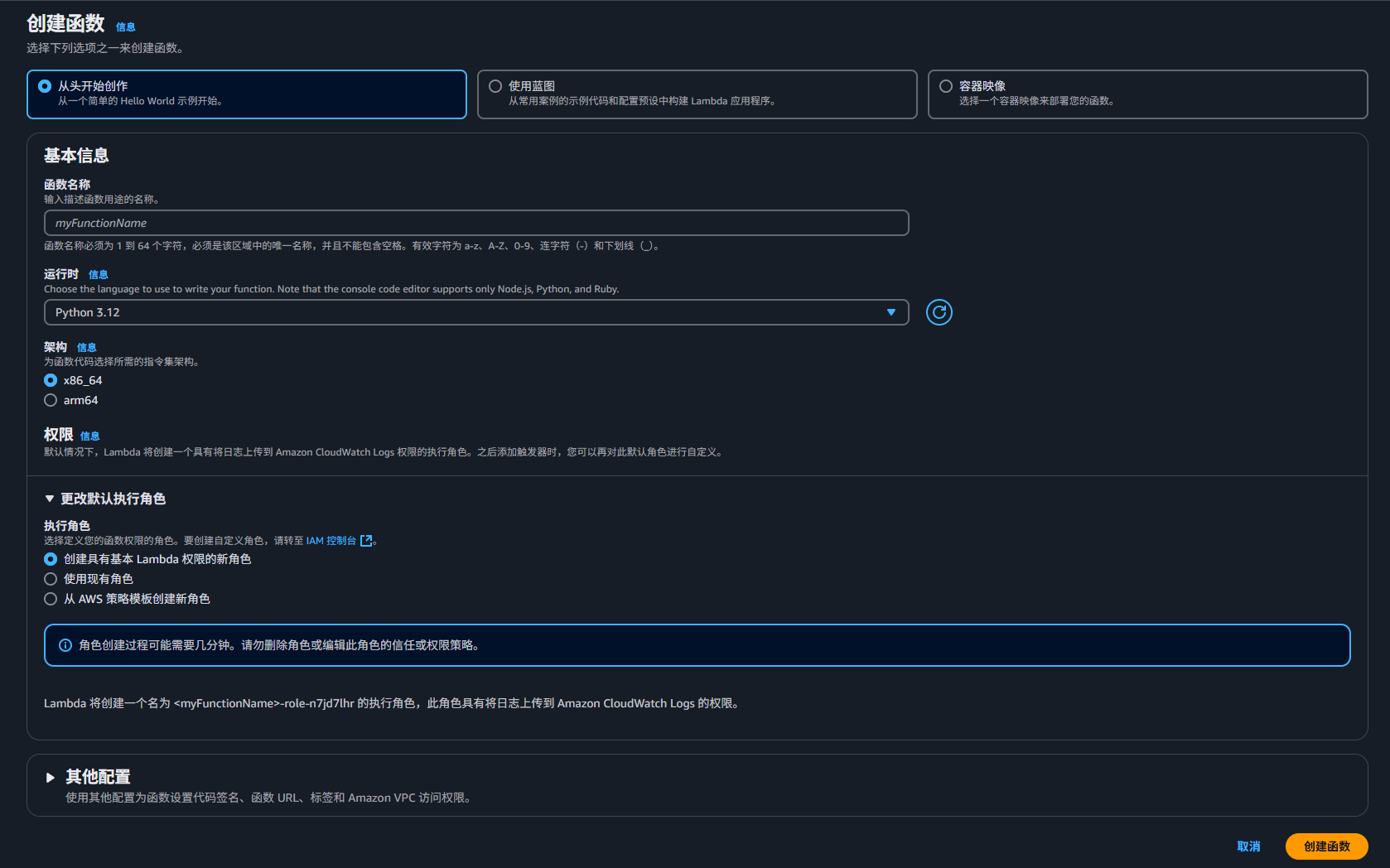
1、创建lambda函数

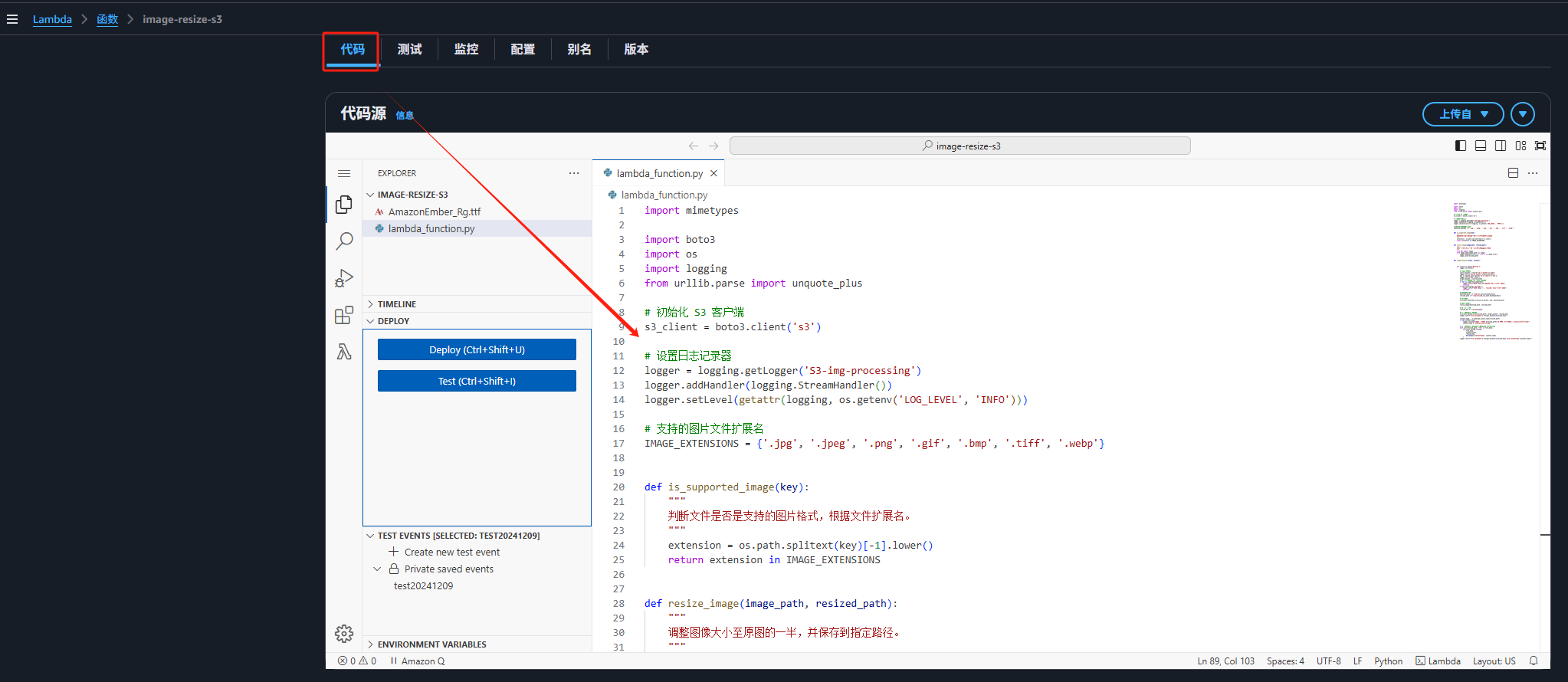
2、将代码复制到lambda中后点击Deploy。
import mimetypes


import boto3
import os
import logging
from urllib.parse import unquote_plus

# 初始化 S3 客户端
s3_client = boto3.client('s3')

# 设置日志记录器
logger = logging.getLogger('S3-img-processing')
logger.addHandler(logging.StreamHandler())
logger.setLevel(getattr(logging, os.getenv('LOG_LEVEL', 'INFO')))

# 支持的图片文件扩展名
IMAGE_EXTENSIONS = {'.jpg', '.jpeg', '.png', '.gif', '.bmp', '.tiff', '.webp'}


def is_supported_image(key):
    """
    判断文件是否是支持的图片格式,根据文件扩展名。
    """
    extension = os.path.splitext(key)[-1].lower()
    return extension in IMAGE_EXTENSIONS


def resize_image(image_path, resized_path):
    """
    调整图像大小至原图的一半,并保存到指定路径。
    """
    from PIL import Image
    with Image.open(image_path) as image:
        image.thumbnail(tuple(x / 2 for x in image.size))
        image.save(resized_path)


def lambda_handler(event, context):


    for record in event['Records']:
        logger.info(event)

        # 解析事件记录
        source_bucket = record['s3']['bucket']['name']
        logger.info(f'Source bucket: {source_bucket}')
        key = unquote_plus(record['s3']['object']['key'])
        logger.info(f'Key: {key}')
        target_bucket = source_bucket
        # 跳过非图片文件和目标目录中的文件
        if not is_supported_image(key):
            logger.info(f"文件 {key} 不是支持的图片格式,跳过处理")
            continue
        if key.startswith('resized/'):
            logger.info(f"文件 {key} 位于 resized/ 目录中,跳过处理")
            continue

        # 临时文件路径
        download_path = f'/tmp/{os.path.basename(key)}'
        resized_path = f'/tmp/resized_{os.path.basename(key)}'

        # 下载文件
        s3_client.download_file(source_bucket, key, download_path)

        # 调整图片大小
        resize_image(download_path, resized_path)

        # 构造上传路径
        resized_key = f'resized/{key}'

        # 上传文件到目标存储桶
        s3_client.upload_file(resized_path, target_bucket, resized_key)
        logger.info(f'File uploaded to {target_bucket}/{resized_key}')

        content_type, _ = mimetypes.guess_type(resized_path)
        if not content_type:
            logger.warning(f"无法检测文件 {resized_path} 的 MIME 类型,默认为 binary/octet-stream")
            content_type = "binary/octet-stream"

        # 上传文件到目标存储桶,设置正确的 ContentType
        with open(resized_path, "rb") as file_data:
            s3_client.upload_fileobj(
                file_data,
                target_bucket,
                resized_key,
                ExtraArgs={"ContentType": content_type}
            )
        logger.info(f'File uploaded to {target_bucket}/{resized_key} with ContentType {content_type}')

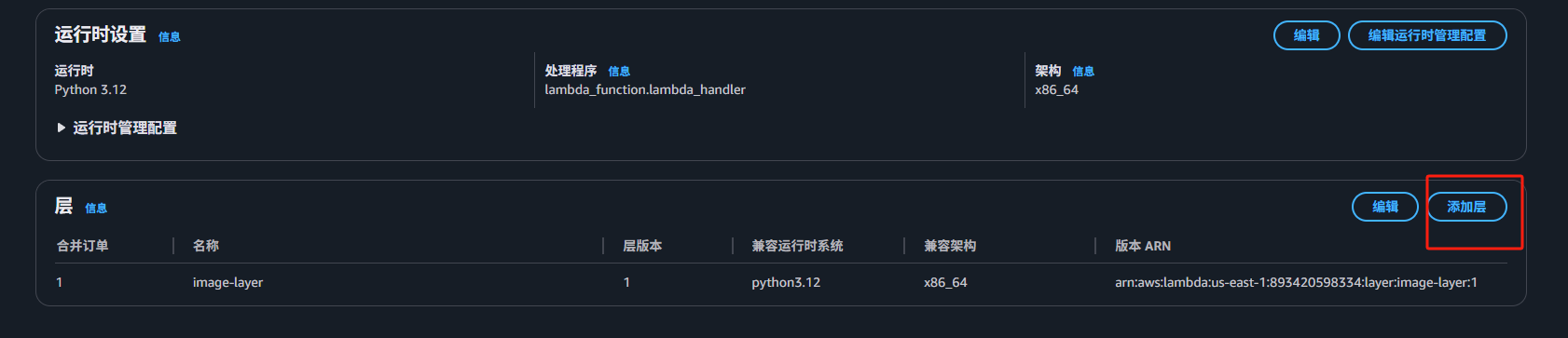
3、添加层作为代码运行时的依赖库,可以通过使用别人打包好的layer(https://github.com/keithrozario/Klayers/tree/master/deployments),根据运行的版本和需要使用的客户进行选择。
4、为lambda添加S3权限
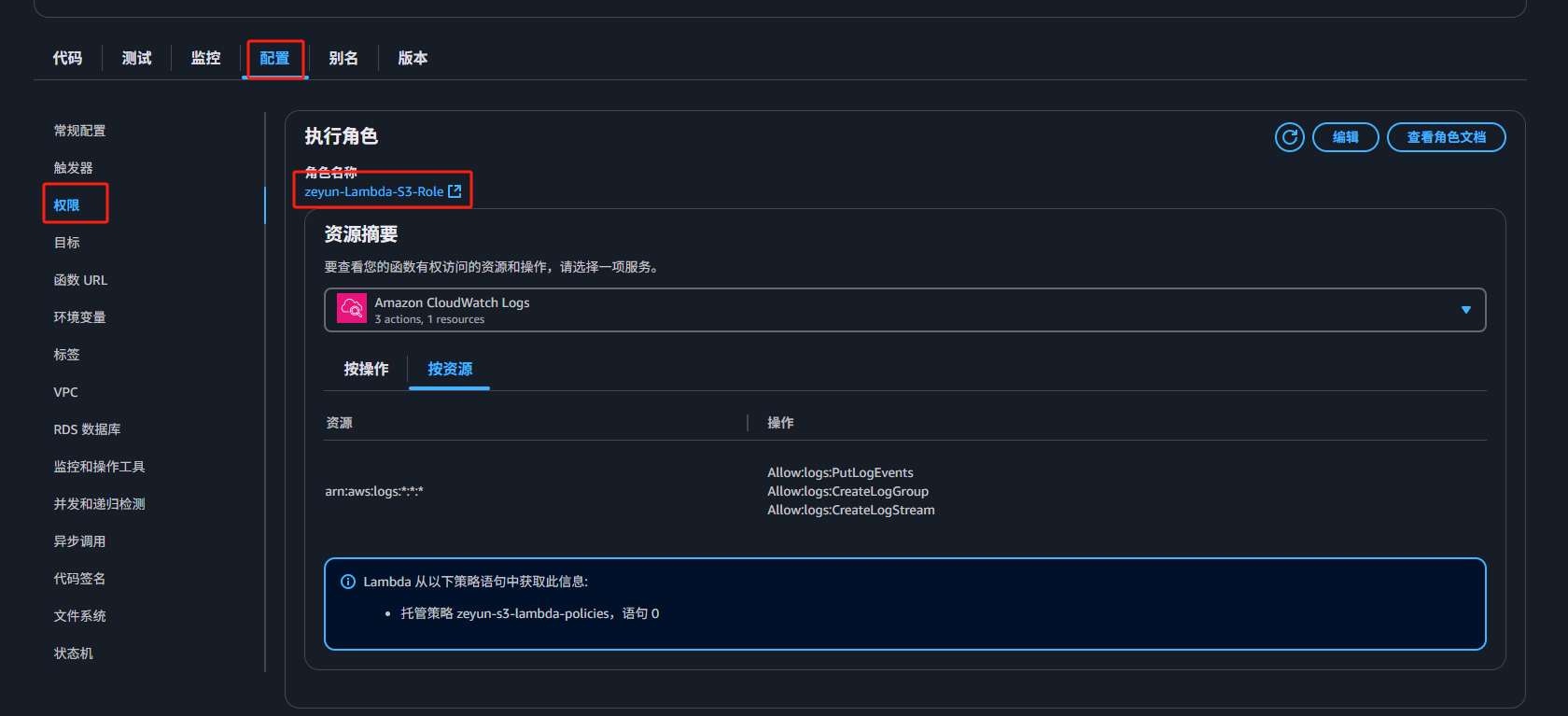
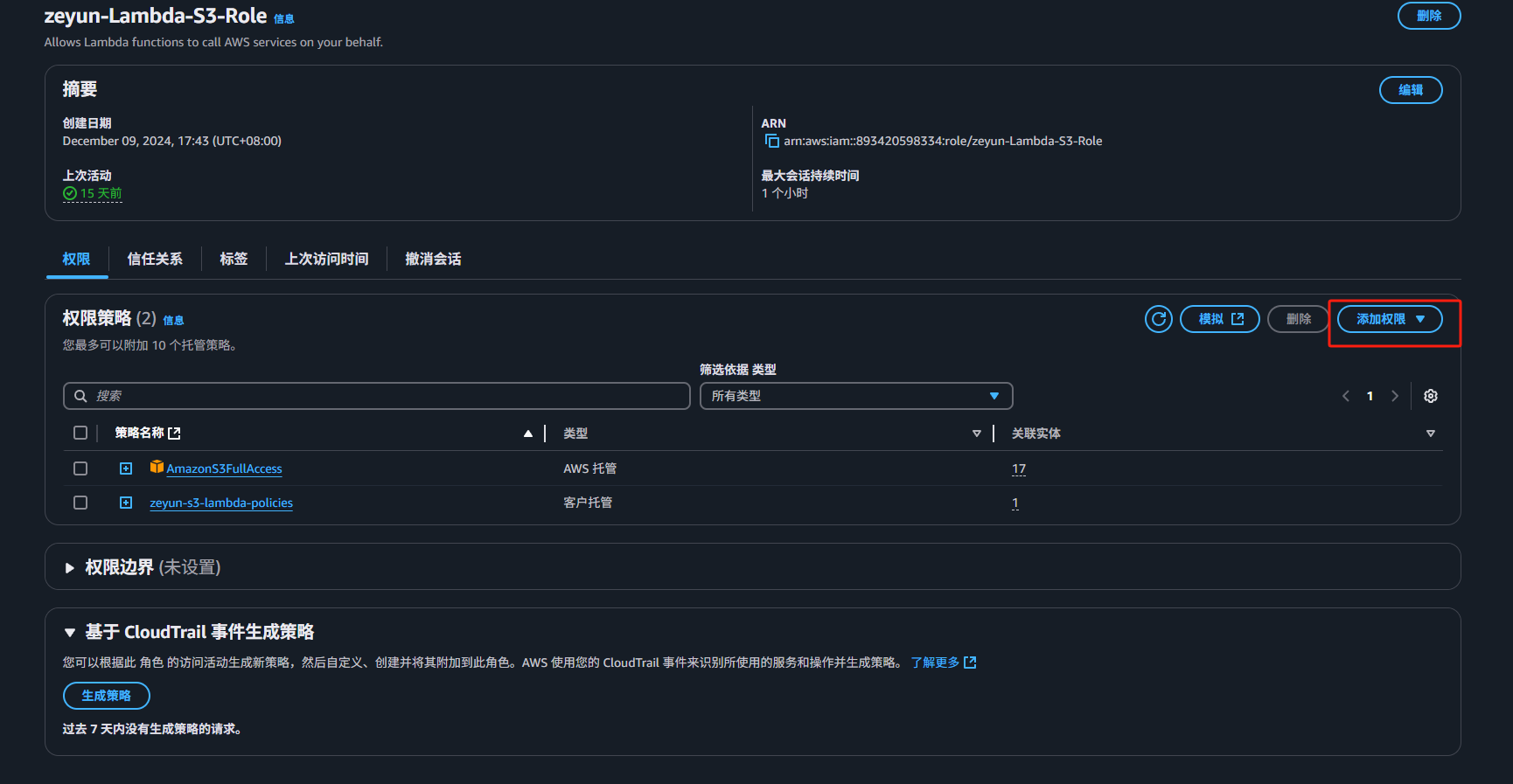
添加AmazonS3FullAccess权限

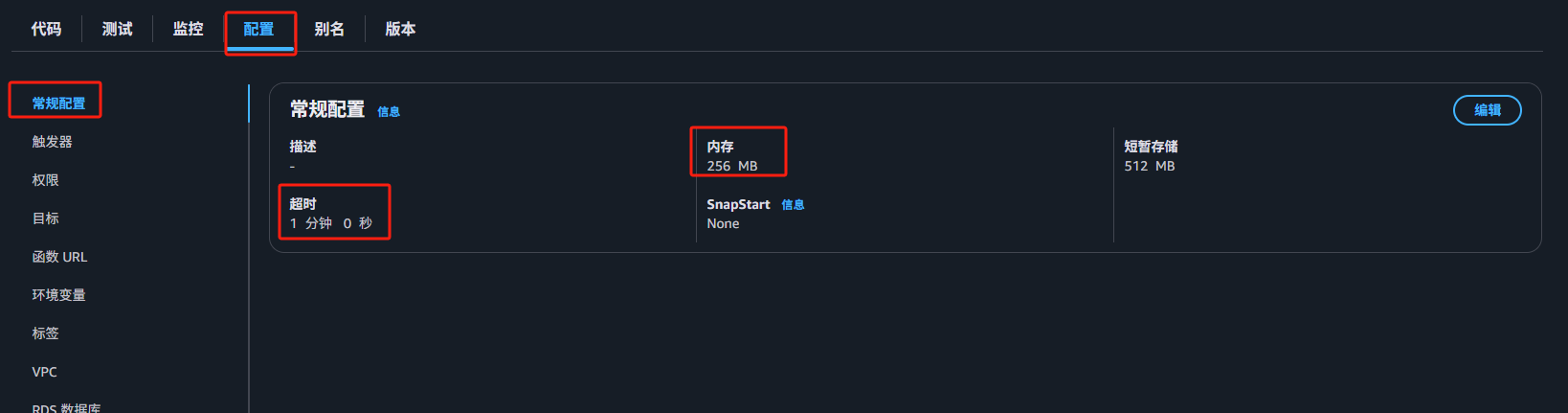
5、修改常规配置,超时改为1分钟、内存改为256M

6、添加触发器
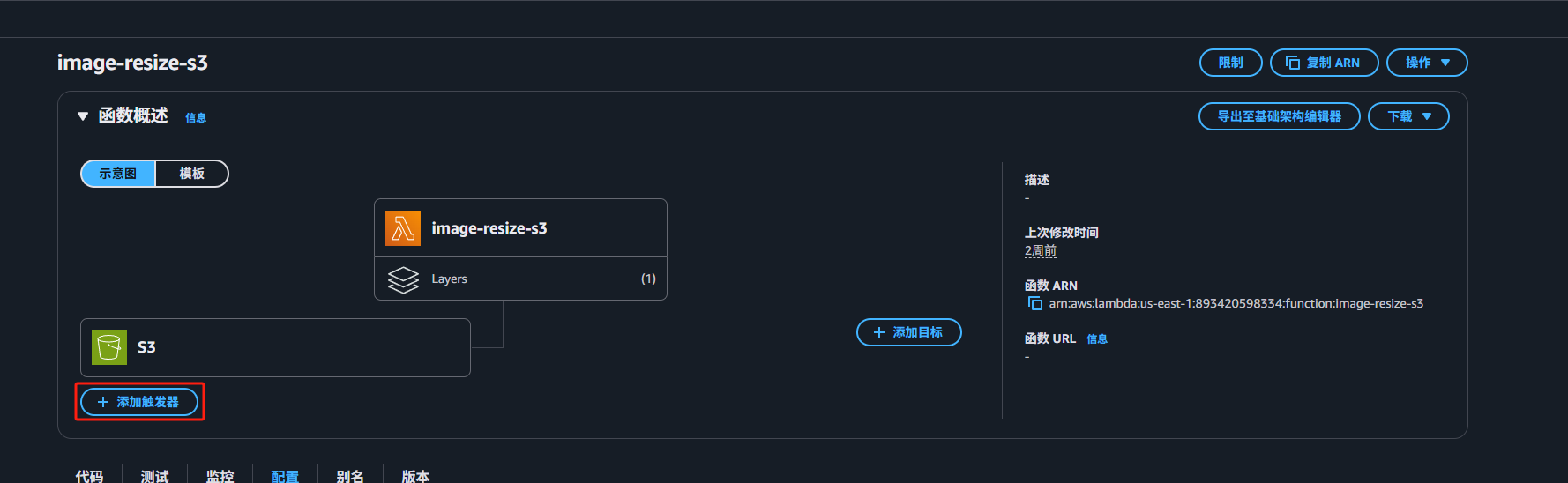
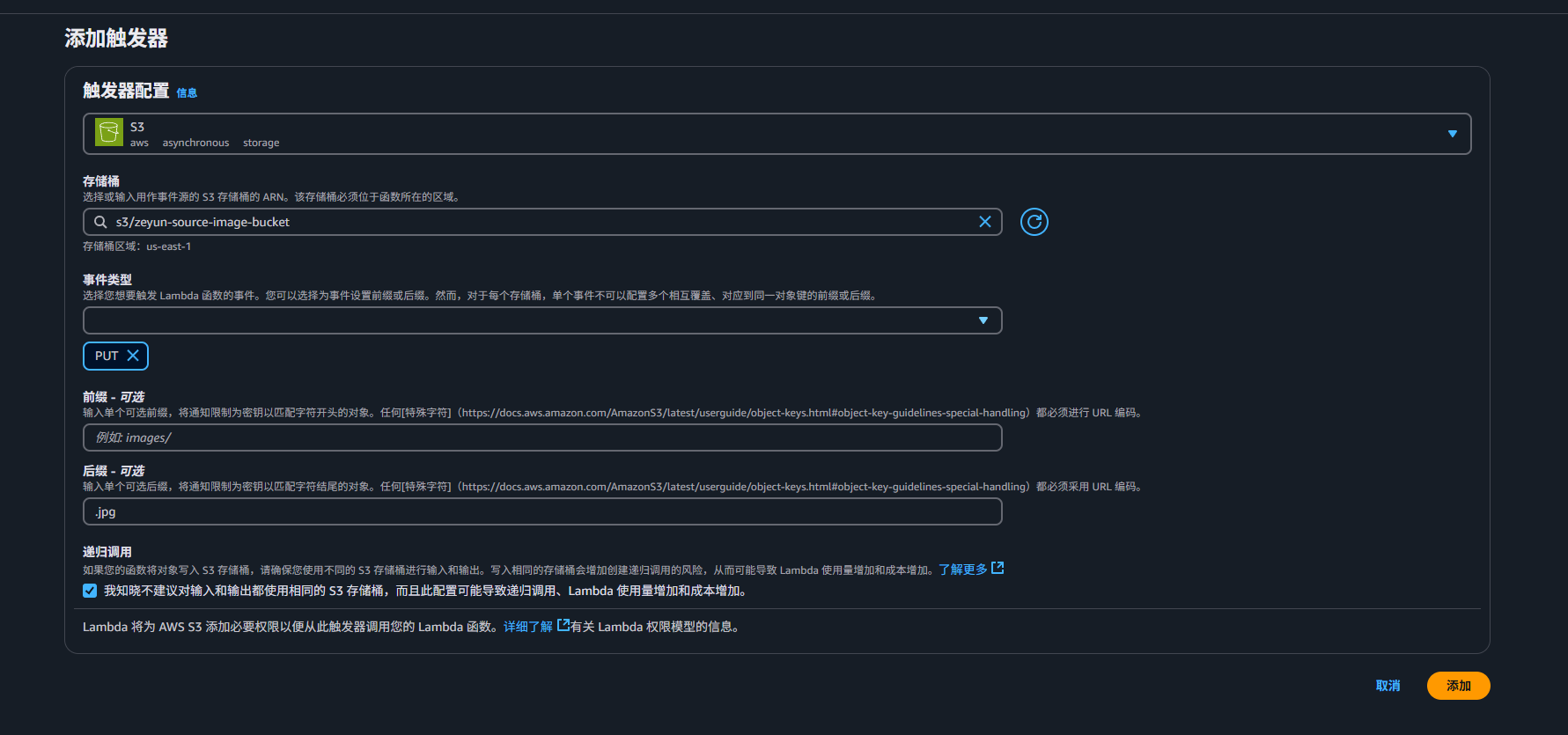
选择对应的S3、事件类型选择PUT。前缀可添加指定的文件夹、后缀可添加图片的后缀名.jpg,如果需要多个后缀名则需要再添加一个触发器。
7、验证

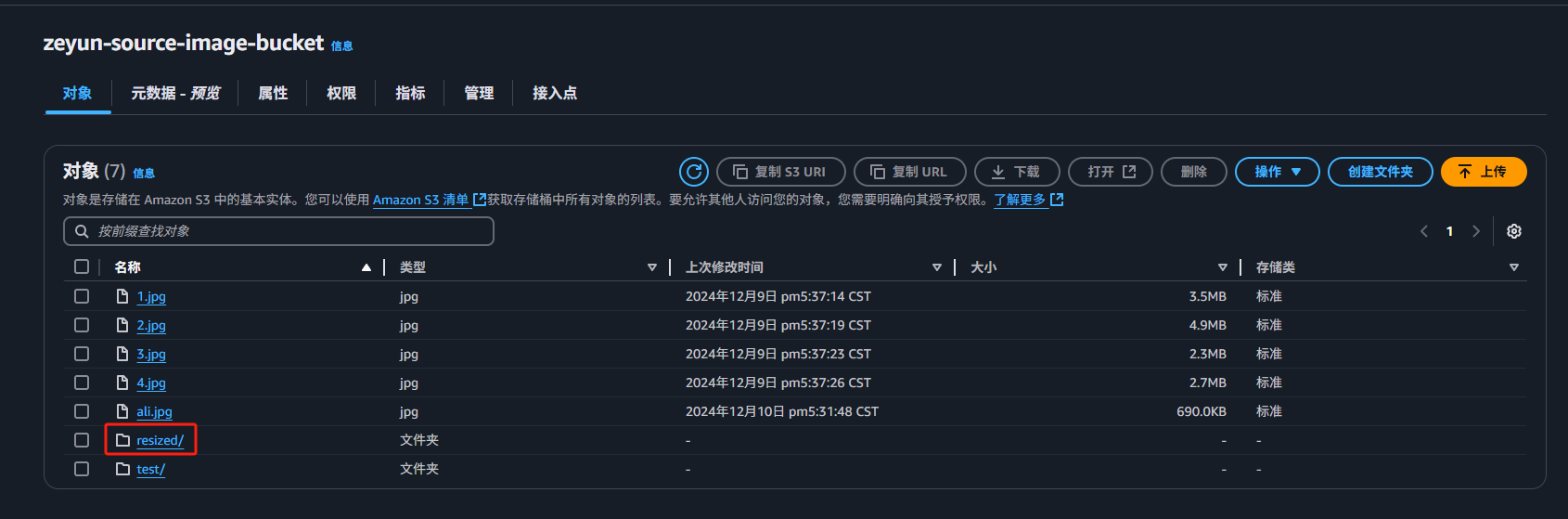
往存储桶中上传文件后即可在当前存储桶中resized/文件夹下看见缩略后的图片文件
S3中剩余的图片文件处理

lambda只会对新上传的图片进行处理,而S3中老的图片不会进行任何处理,那么就需要手动执行脚本处理S3中所有需要进行缩略的图片。

可在EC2或者是本地执行如下代码:

import mimetypes
import boto3
import os
import logging
from botocore.exceptions import ClientError

# 初始化 S3 客户端和资源对象
s3_client = boto3.client('s3',aws_access_key_id="", aws_secret_access_key="")
s3_resource = boto3.resource('s3',aws_access_key_id="", aws_secret_access_key="")

# 设置日志记录器
logger = logging.getLogger('S3-img-processing')
logger.addHandler(logging.StreamHandler())
logger.setLevel(getattr(logging, os.getenv('LOG_LEVEL', 'INFO')))

# 支持的图片文件扩展名
IMAGE_EXTENSIONS = {'.jpg', '.jpeg', '.png', '.gif', '.bmp', '.tiff', '.webp'}


def is_supported_image(key):
"""
判断文件是否是支持的图片格式,根据文件扩展名。
"""
extension = os.path.splitext(key)[-1].lower()
return extension in IMAGE_EXTENSIONS


def resize_image(image_path, resized_path):
"""
调整图像大小至原图的一半,并保存到指定路径。
"""
from PIL import Image
with Image.open(image_path) as image:
image.thumbnail(tuple(x / 2 for x in image.size))
image.save(resized_path)


def process_image(bucket_name, key):
"""
处理指定 S3 文件,将其大小调整后保存到目标路径。
"""
try:
# 跳过非图片文件和目标目录中的文件
if not is_supported_image(key):
logger.info(f"文件 {key} 不是支持的图片格式,跳过处理")
return
if key.startswith('resized/'):
logger.info(f"文件 {key} 位于 resized/ 目录中,跳过处理")
return

# 临时文件路径
download_path = f'/tmp/{os.path.basename(key)}'
resized_path = f'/tmp/resized_{os.path.basename(key)}'

# 下载文件
s3_client.download_file(bucket_name, key, download_path)

# 调整图片大小
resize_image(download_path, resized_path)

# 构造上传路径
resized_key = f'resized/{key}'

# 上传文件到目标存储桶
content_type, _ = mimetypes.guess_type(resized_path)
if not content_type:
logger.warning(f"无法检测文件 {resized_path} MIME 类型,默认为 binary/octet-stream")
content_type = "binary/octet-stream"

with open(resized_path, "rb") as file_data:
s3_client.upload_fileobj(
file_data,
bucket_name,
resized_key,
ExtraArgs={"ContentType": content_type}
)
logger.info(f'File uploaded to {bucket_name}/{resized_key} with ContentType {content_type}')

except ClientError as e:
logger.error(f"处理文件 {key} 时出错: {e}")


def scan_and_process_images(bucket_name, folder):
"""
扫描 S3 存储桶中的指定文件夹,并处理支持的图片文件。
"""
bucket = s3_resource.Bucket(bucket_name)
prefix = folder.rstrip('/') + '/' # 确保以 '/' 结尾

for obj in bucket.objects.filter(Prefix=prefix):
logger.info(f"Processing file: {obj.key}")
process_image(bucket_name, obj.key)


if __name__ == "__main__":
# 从环境变量获取存储桶名称和目标文件夹
bucket_name = 'bucket_name'
folder = 'folder'

logger.info(f"开始扫描存储桶 {bucket_name} 中文件夹 {folder} 的文件")
scan_and_process_images(bucket_name, folder)
logger.info("所有文件处理完成")


总结

此方案通过 AWS Lambda 和 S3 的无缝集成,实现了图片缩略图生成的自动化和高效化。无服务器架构使得此方案具有以下优点:

  1. 弹性扩展:无需担心并发请求数量,Lambda 按需扩展。
  2. 低成本:仅为使用的计算资源付费,无需维护服务器。
  3. 易部署和维护:基于 AWS 服务的简单配置和强大功能。

这种架构适用于任何需要高效处理图片的场景,是现代应用开发中的最佳实践之一。

自我判定

#

判定描述

自我判定(是/否)

1在各搜索引擎中是否能找到知识信息(包括但不限于Google、百度、Bing)
2是否需要代码集成开发