
场景描述:
在云上环境中,随着业务发展和实例数量的增长,安全组规则往往会逐渐膨胀。许多历史遗留的 IP 白名单或端口规则可能已不再使用,但仍被保留在配置中。这不仅导致规则管理复杂,还可能带来潜在的安全风险。
为了实现精细化的安全管理,可以借助 VPC Flow Logs(VPC 流日志) 对网络流量进行分析,识别哪些安全组规则仍在被访问、哪些长期未使用,从而为规则清理提供数据依据。
方案概述:
为满足用户需求,我们将执行以下步骤:
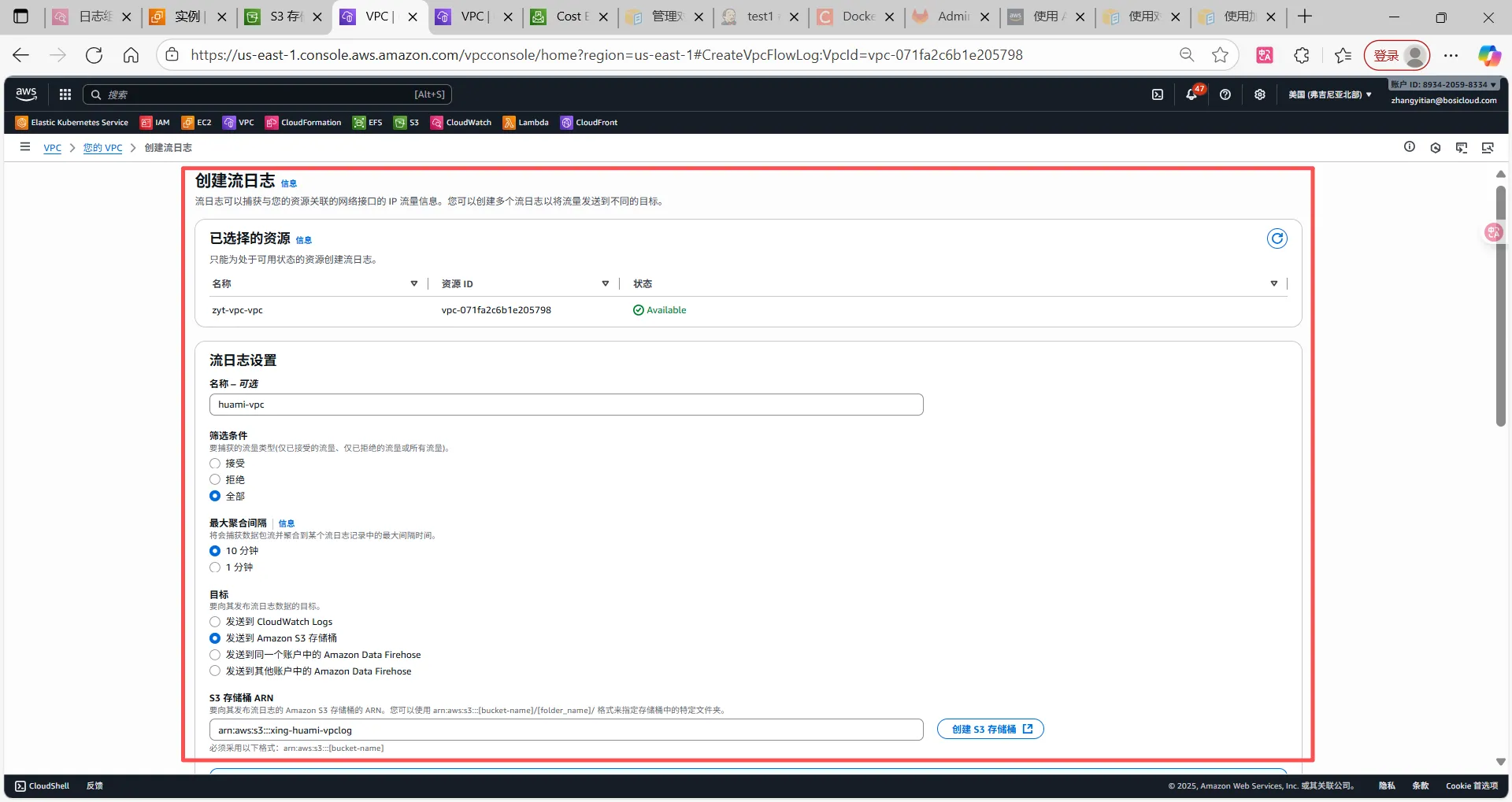
- 开始VPC Flow Logs
- 将日志存储方式修改为S3
- 使用Athena进行日志分析
- 通过shell脚本获取安全组信息、Athena查询结果
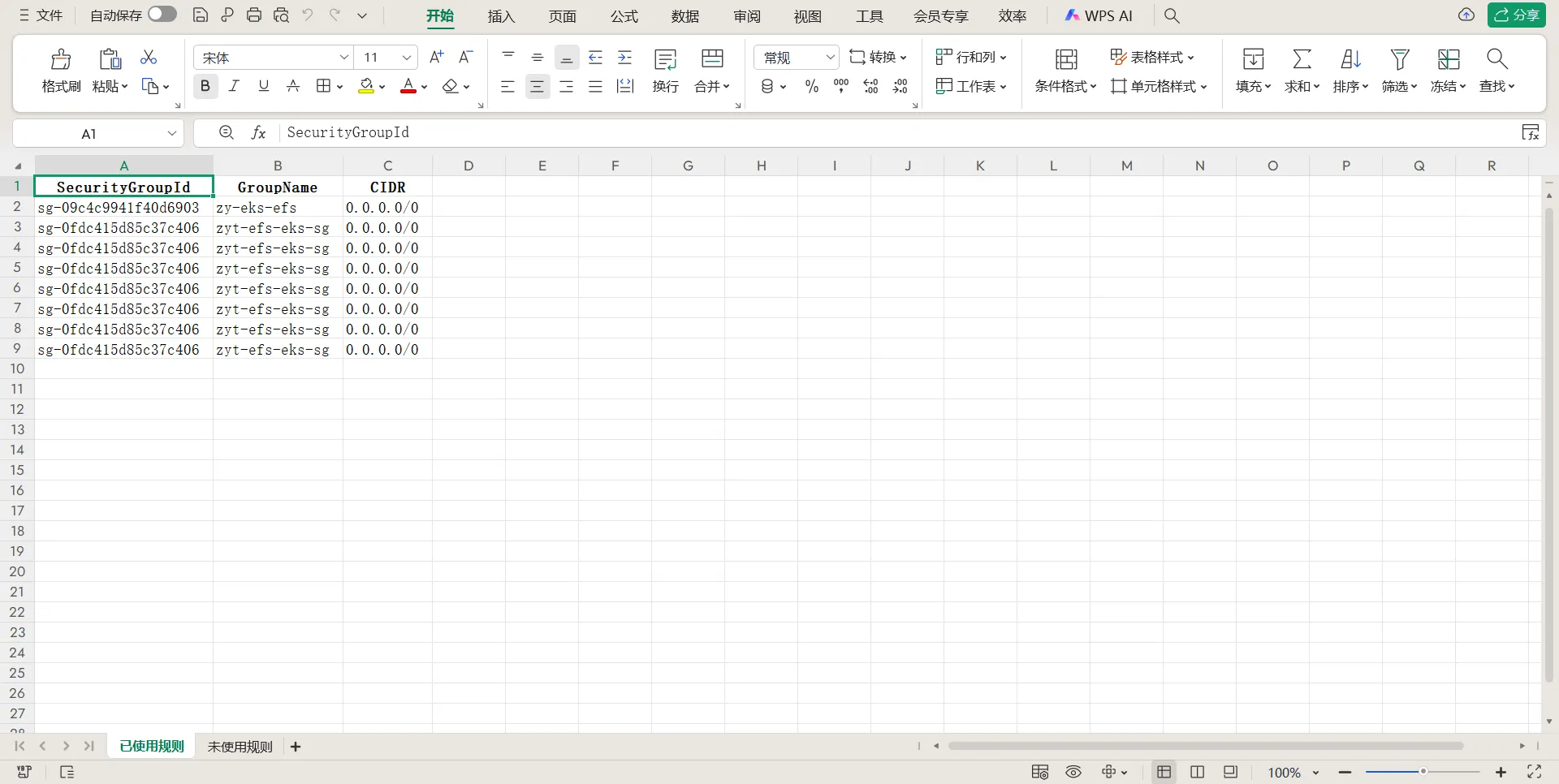
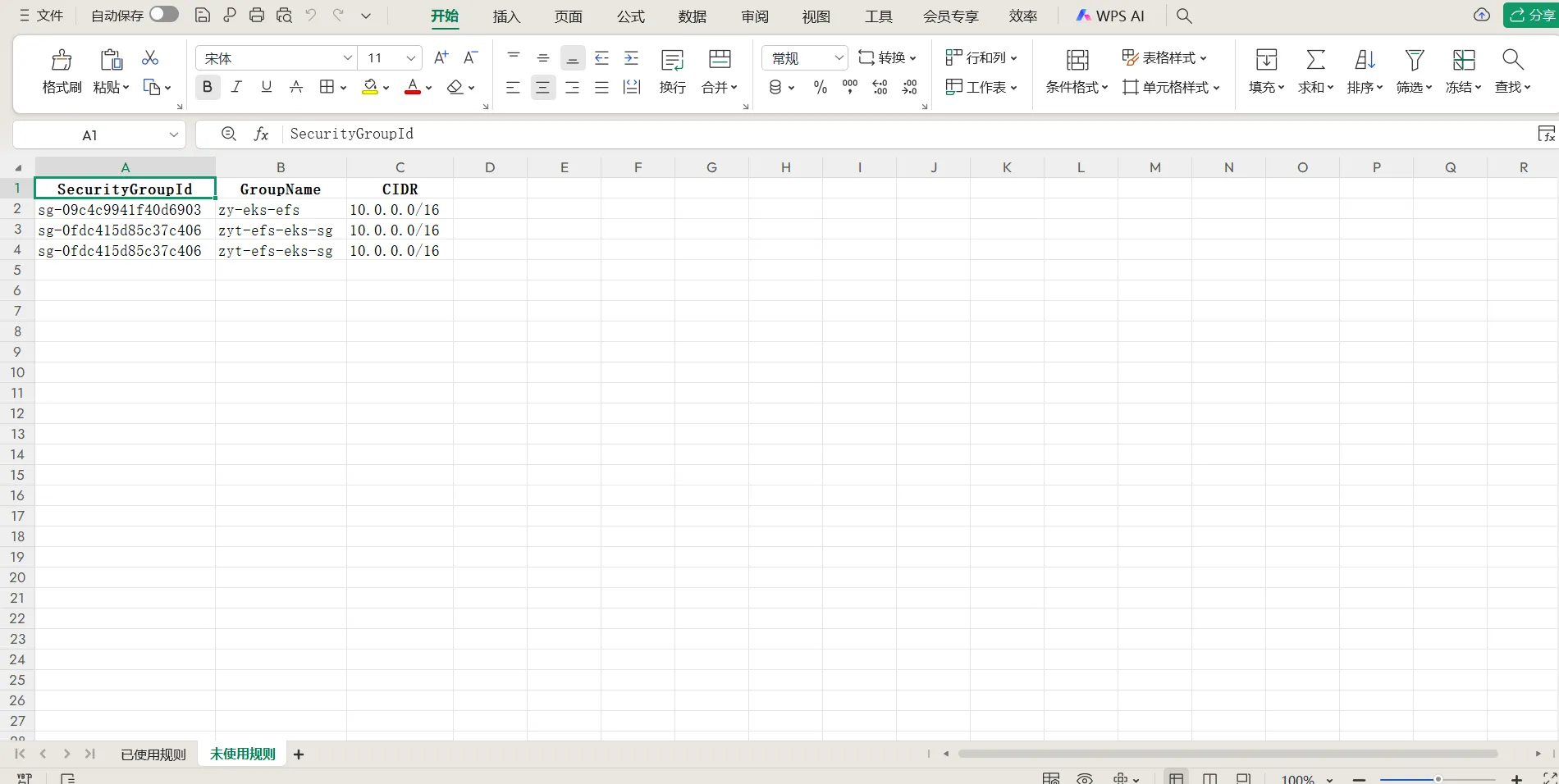
- 使用Python进行数据分析并导出为execl格式
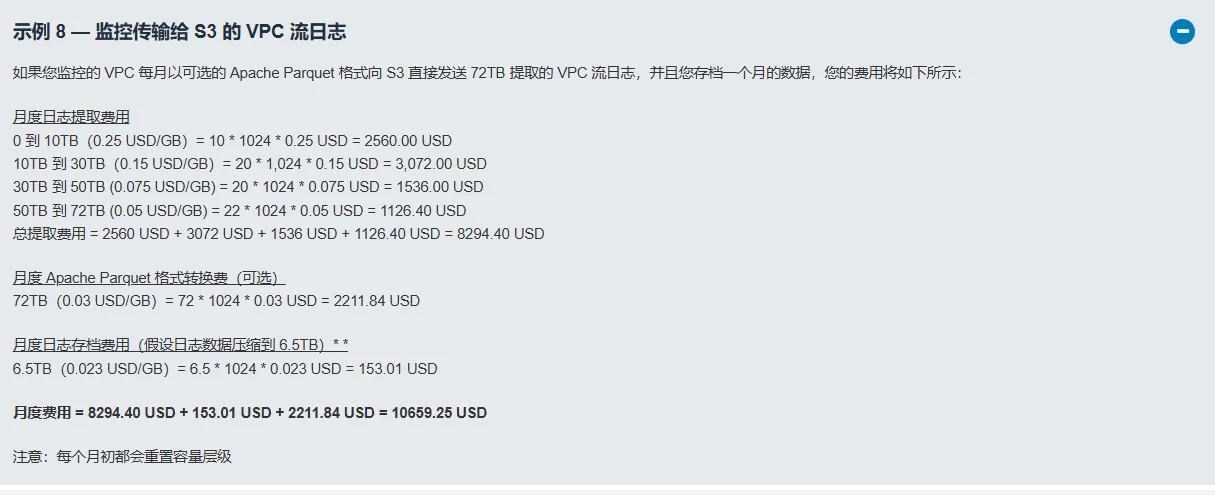
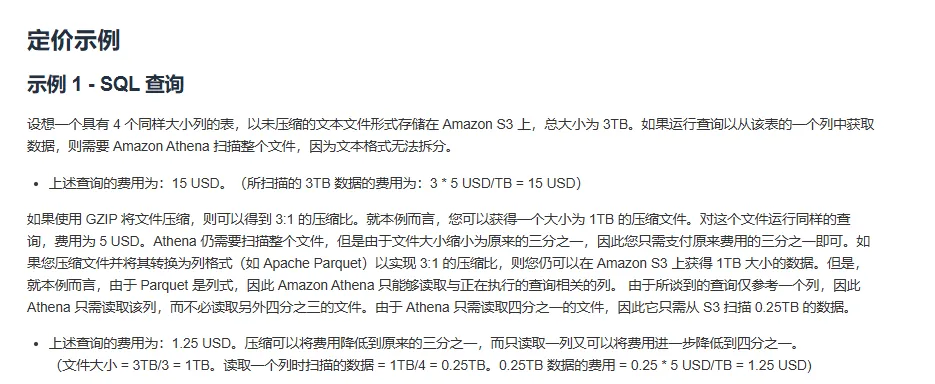
费用说明
VPC Flow Logs Pricing
https://aws.amazon.com/cn/cloudwatch/pricing/
Athena
https://aws.amazon.com/cn/athena/pricing/
操作流程
开启VPC Flow Logs日志

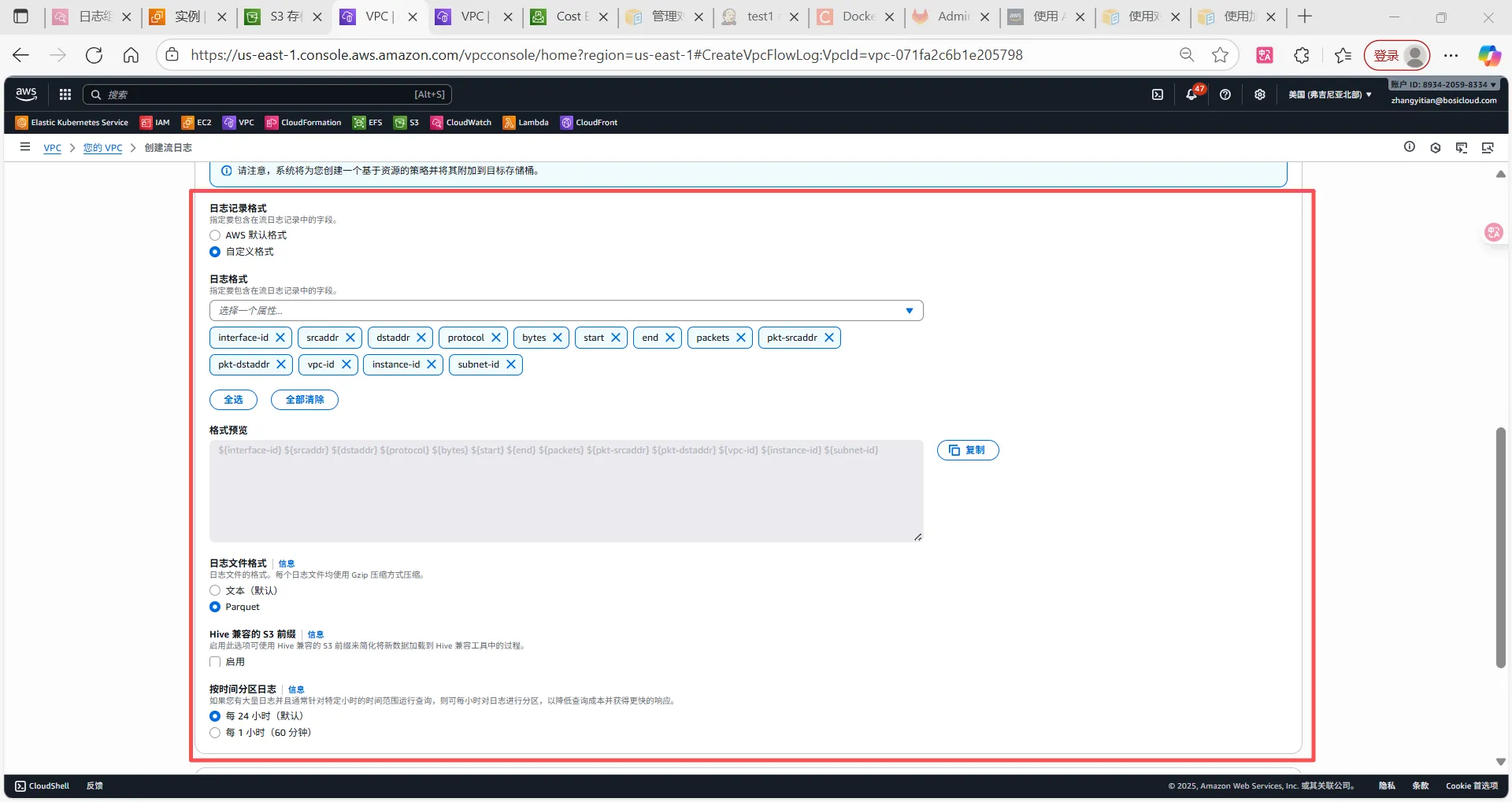
日志记录格式中需选择一下字段
${interface-id} ${srcport} ${dstport} ${protocol} ${bytes} ${packets} ${start} ${end} ${action} ${subnet-id} ${vpc-id} ${instance-id} ${pkt-dstaddr} ${pkt-srcaddr}
使用Athena进行日志分析
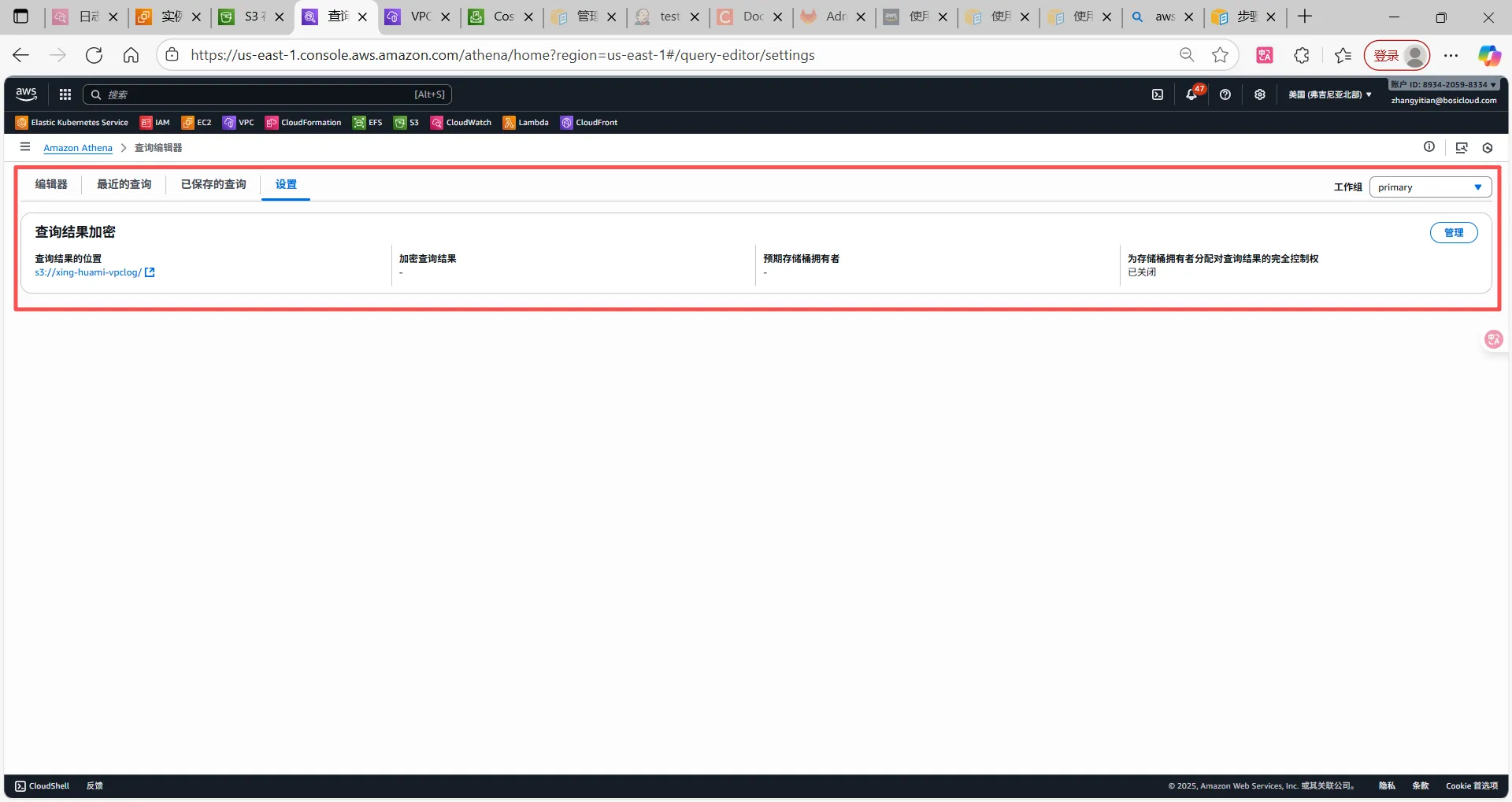
设置查询结果保存位置
创建数据库、表
# 创建数据库
CREATE DATABASE huami_vpc_flow_logs

# 创建数据表
CREATE EXTERNAL TABLE IF NOT EXISTS vpc_flow_logs_parquet (
  version int,
  account_id string,
  interface_id string,
  srcaddr string,
  dstaddr string,
  srcport int,
  dstport int,
  protocol int,
  packets bigint,
  bytes bigint,
  start bigint,
  `end` bigint,
  action string,
  log_status string,
  vpc_id string,
  subnet_id string,
  instance_id string,
  tcp_flags int,
  type string,
  pkt_srcaddr string,
  pkt_dstaddr string
)
STORED AS PARQUET
LOCATION 's3://xing-huami-vpclog/AWSLogs/aws-account-id=893420598334/aws-service=vpcflowlogs/aws-region=us-east-1/'
TBLPROPERTIES (
  'classification'='parquet'
);


# Athena识别分区
MSCK REPAIR TABLE vpc_flow_logs_parquet;

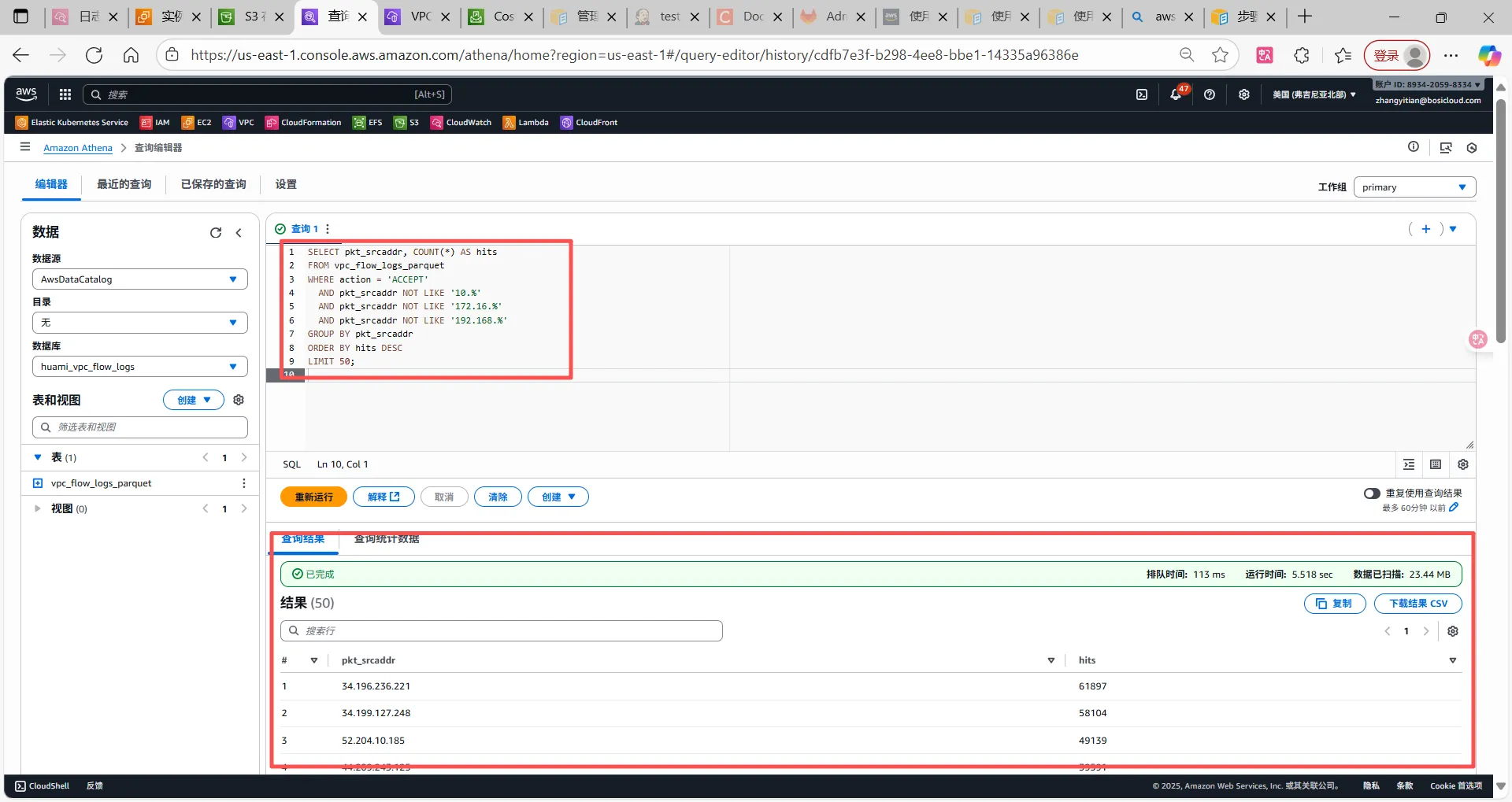
# 测试查询语句
SELECT pkt_srcaddr, COUNT(*) AS hits
FROM vpc_flow_logs_parquet
WHERE action = 'ACCEPT'
  AND pkt_srcaddr NOT LIKE '10.%'
  AND pkt_srcaddr NOT LIKE '172.16.%'
  AND pkt_srcaddr NOT LIKE '192.168.%'
GROUP BY pkt_srcaddr
ORDER BY hits DESC
LIMIT 50;
EC2中操作
查询安全组相关信息
#!/bin/bash
set -e

# 安全组 ID (多个用空格分开)
SG_IDS=("sg-0fdc415d85c37c406" "sg-09c4c9941f40d6903")

echo "开始导出安全组信息..."

aws ec2 describe-security-groups \
  --group-ids ${SG_IDS[@]} \
  --query "SecurityGroups[*].{GroupId:GroupId,GroupName:GroupName,IpRanges:IpPermissions[*].IpRanges[*].CidrIp}" \
  --output json > security_groups.json

echo "安全组信息已保存到 security_groups.json"
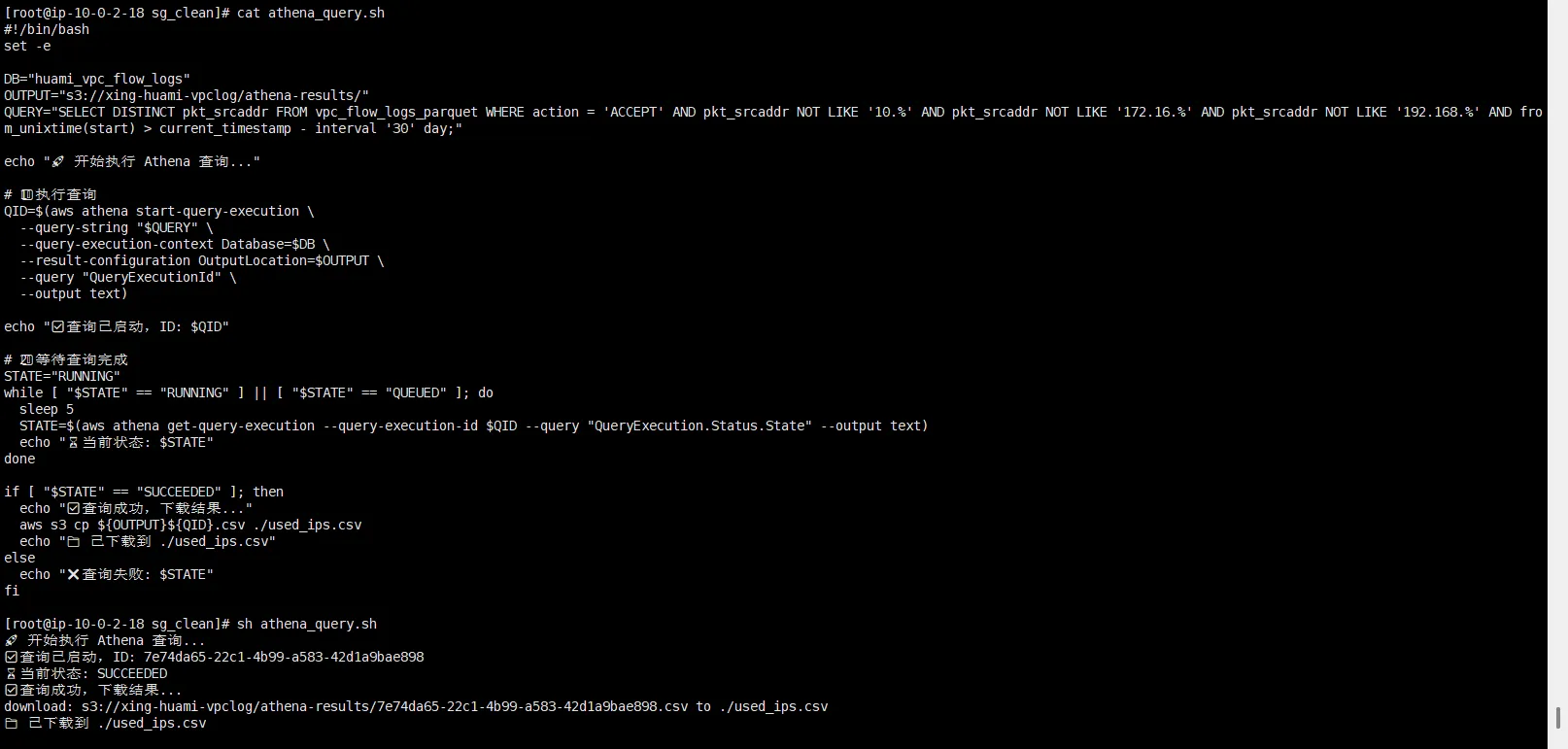
调用Athena查询访问情况
#!/bin/bash
set -e

DB="huami_vpc_flow_logs"
OUTPUT="s3://xing-huami-vpclog/athena-results/"
QUERY="SELECT DISTINCT pkt_srcaddr FROM vpc_flow_logs_parquet WHERE action = 'ACCEPT' AND pkt_srcaddr NOT LIKE '10.%' AND pkt_srcaddr NOT LIKE '172.16.%' AND pkt_srcaddr NOT LIKE '192.168.%' AND from_unixtime(start) > current_timestamp - interval '30' day;"

echo "开始执行 Athena 查询..."

# 执行查询
QID=$(aws athena start-query-execution \
  --query-string "$QUERY" \
  --query-execution-context Database=$DB \
  --result-configuration OutputLocation=$OUTPUT \
  --query "QueryExecutionId" \
  --output text)

echo "查询已启动,ID: $QID"

#等待查询完成
STATE="RUNNING"
while [ "$STATE" == "RUNNING" ] || [ "$STATE" == "QUEUED" ]; do
  sleep 5
  STATE=$(aws athena get-query-execution --query-execution-id $QID --query "QueryExecution.Status.State" --output text)
  echo "当前状态: $STATE"
done

if [ "$STATE" == "SUCCEEDED" ]; then
  echo "查询成功,下载结果..."
  aws s3 cp ${OUTPUT}${QID}.csv ./used_ips.csv
  echo "已下载到 ./used_ips.csv"
else
  echo "查询失败: $STATE"
fi
使用Python过滤安全组中未使用网段
执行脚本前需要安装openpyxl依赖包
pip3 install openpyxl
import json
import csv
import ipaddress
from openpyxl import Workbook
from openpyxl.styles import Font, Alignment
from datetime import datetime

# === 读取安全组配置 ===
with open('security_groups.json') as f:
    sg_data = json.load(f)

# === 读取访问过的IP ===
with open('used_ips.csv') as f:
    used_ips = [row[0].strip('"') for row in csv.reader(f) if row and row[0] != 'pkt_srcaddr']

used_ips = [ipaddress.ip_address(ip) for ip in used_ips if ip]

used_rules = []
unused_rules = []

# === 匹配安全组规则 ===
for sg in sg_data:
    sg_id = sg["GroupId"]
    sg_name = sg.get("GroupName", "")
    ip_ranges = sg.get("IpRanges", [])

    # 处理嵌套数组(每个元素可能是 ["1.2.3.4/32"])
    flat_ranges = []
    for entry in ip_ranges:
        if isinstance(entry, list):
            flat_ranges.extend(entry)
        elif isinstance(entry, str):
            flat_ranges.append(entry)

    for cidr in flat_ranges:
        try:
            network = ipaddress.ip_network(cidr)
            if any(ip in network for ip in used_ips):
                used_rules.append({
                    "SecurityGroupId": sg_id,
                    "GroupName": sg_name,
                    "CIDR": cidr
                })
            else:
                unused_rules.append({
                    "SecurityGroupId": sg_id,
                    "GroupName": sg_name,
                    "CIDR": cidr
                })
        except ValueError:
            continue

# === 创建 Excel 文件 ===
wb = Workbook()

# 已使用 sheet
ws_used = wb.active
ws_used.title = "已使用规则"
ws_used.append(["SecurityGroupId", "GroupName", "CIDR"])
for rule in used_rules:
    ws_used.append([rule["SecurityGroupId"], rule["GroupName"], rule["CIDR"]])

# 未使用 sheet
ws_unused = wb.create_sheet("未使用规则")
ws_unused.append(["SecurityGroupId", "GroupName", "CIDR"])
for rule in unused_rules:
    ws_unused.append([rule["SecurityGroupId"], rule["GroupName"], rule["CIDR"]])

# === 美化表头 ===
for ws in [ws_used, ws_unused]:
    for cell in ws[1]:
        cell.font = Font(bold=True)
        cell.alignment = Alignment(horizontal="center")
    for col in ws.columns:
        max_length = max(len(str(cell.value)) if cell.value else 0 for cell in col)
        ws.column_dimensions[col[0].column_letter].width = max_length + 2

# === 输出文件名带时间戳 ===
timestamp = datetime.now().strftime("%Y%m%d_%H%M%S")
output_file = f"sg_analysis_{timestamp}.xlsx"

wb.save(output_file)
print(f"分析完成,结果已保存为 {output_file}")

将文件下载到本地查看
结语
在现代云环境中,安全组管理是网络安全的重要组成部分。
通过将 VPC Flow Logs + Athena + 自动化分析脚本 结合使用,能够实现安全组规则的动态可视化管理:
不仅可以识别出实际使用的规则,也能精准发现长期未被命中的冗余配置,从而降低安全风险、简化维护工作。
在与 ECS、EC2、Auto Scaling 等架构结合时,这种方式同样适用。
即使在无法直接使用原生监控或审计功能的情况下,我们依然可以通过 日志分析与自定义告警仪表盘 的方式,实现同样高效、可追踪的安全治理目标。